
How To Headshot In (CS:GO) CS2
 radoslaw-davidovic
Landing a perfect headshot in CS2 (CS:GO) isn’t just a flashy skill—it’s a game-changing tactic that separates the pros from the rest. Whether you’re grinding competitive matches or climbing the leaderboard, mastering headshots is essential for dominating your opponents. In this guide, we’ll break down the mechanics of CS2 (CS:GO) headshots, explore how to improve your aim, and share tips on choosing the best CS2 crosshair for headshots. Plus, we’ll look at real CS2 (CS:GO) headshot stats to help you understand what makes elite players so deadly accurate. If you’re serious about improving your Counter Strike headshot consistency and becoming a top fragger, this guide is your starting point.
In article you will find:
Why You Should Always Aim for Headshots in CS2 (CS:GO)
Let’s first understand why a headshot is so important in CS2 (CS:GO). Why focus on tiny pixels when it’s easier to aim for the torso?

As surprising as it may sound, CS2 (CS:GO) is not only about tactics and map control—it’s a precision shooter where mastering the CS2 headshot gives you a massive advantage. The game’s mechanics are designed to reward players who can consistently hit Counter Strike headshots, and understanding that system is key to improving your gameplay.
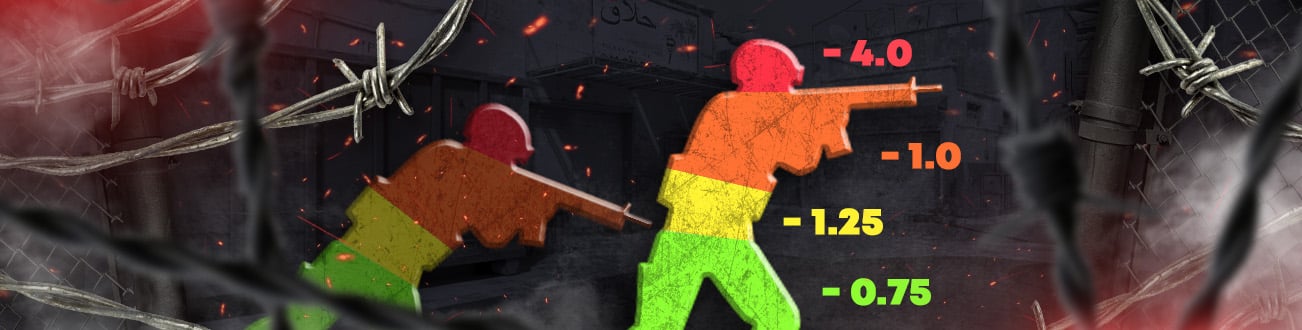
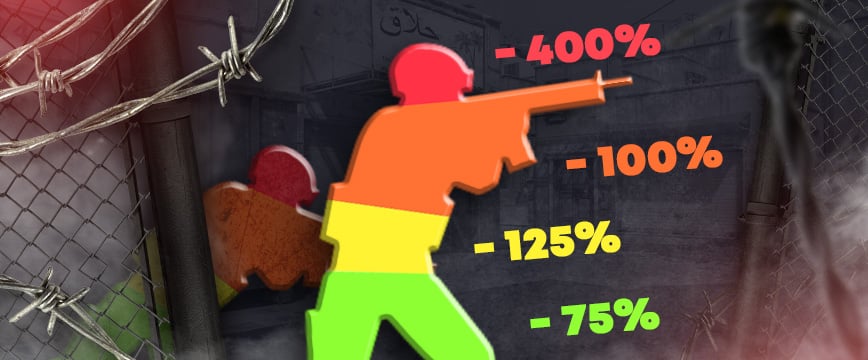
In CS2, your character model is divided into four hit zones—each with its own damage multiplier depending on where the bullet lands. Here’s a simplified breakdown:
| Damage Multiplier | |
| Body Part | Percent |
| Head | 400% |
| Chest and arms | 100% |
| Stomach and pelvis | 125% |
| Legs | 75% |
At first glance, it seems straightforward. Take a pistol like the Glock-18—its base damage is 30 HP. If you land a clean CS2 headshot, the calculation is 30 × 4 = 120 HP—more than enough for a one-shot kill. However, it’s not that simple.
All weapons in the game have another very interesting stat – range. What is it, and how does it work? Let’s figure it out together. Thanks to the caring players who created an incredibly useful table, we can see a lot of interesting information. Here is the table.
In this table, you can find Glock-18, which says that the damage is supposedly 30, but the further away the enemy is, the less damage the pistol does. For example, at a range of 17 meters, one shot will do only 23.90 damage instead of 30. What do you say to that? You can’t kill with one shot anymore because 23.90 x 4 = 95.6. Interesting, isn’t it?
Range Modifier works for all weapons in the game, but the percentage is different. For example, you know for sure that you can kill an enemy without armor with USP-S with one shot to the head, even from a long range. It is because USP-S doesn’t lose damage as much, depending on the range. That’s why in pistol rounds, CTs often have a better chance to secure early CS2 (CS:GO) headshots, especially from long range.
So, why aim for the head? Simple: time to kill (TTK). In a high-stakes match, that split-second difference can mean the round. While your enemy may need three shots to the torso, you only need one well-placed headshot to secure the frag. This not only boosts your chances of survival but also increases your overall CS2 (CS:GO) headshot stats, which are crucial for improving your rank and match performance.
Here is an example of a professional player demonstrating the power of headshot aim.
If you want to learn more about damage, you can read our article.
How to Improve your CS2 Headshots?
Now that we understand the purpose of aim training, let’s learn how to do CS2 (CS:GO) headshots properly. We have compiled a few simple steps for you to follow, after which you will be guaranteed to improve your shooting skills and become a better player on the server.
Best Video Settings for CS2 (CS:GO) Headshots
First of all, let’s go to the settings. One of the main reasons why you might not be hitting your shots could be hidden in the settings.
First, consider the Aspect Ratio that is comfortable for you, as there are three types:
- Normal 4:3
- Widescreen 16:9
- Widescreen 16:10
After that, choose the best resolution for you. If you have a weak PC, try a slightly lower value than the maximum to increase the FPS in the game. If your computer components are good, feel free to set them to the maximum because the better the picture, the better you will see your enemy.
Also, be sure to check your refresh rate. If you have a monitor with 120, 140, 160, or more Hz, be sure to set your own value because this is how you will see the enemy faster, and it will be smoother, which will allow you to react faster and hit the head more accurately.
Also, don’t forget to configure the in-game settings, such as brightness, as it can help you find the enemy in a dark place or see better when the enemy appears there.
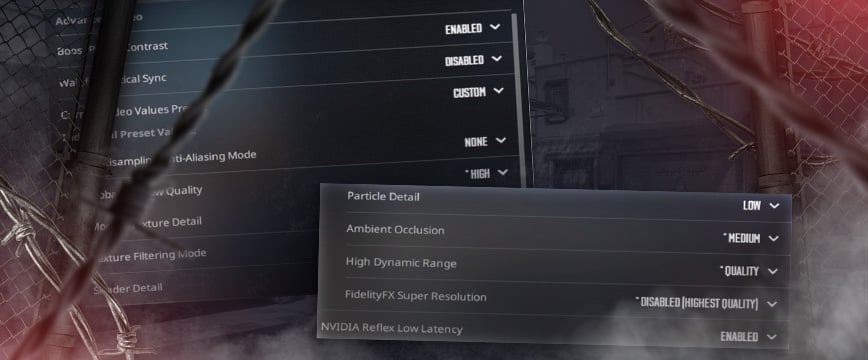
Once you have made these settings, go to Video > Advanced Video tab and configure everything there as you like. However, for your convenience, here are the settings used by EliGE, who plays for Complexity Gaming.
Best Mouse Settings for CS2 (CS:GO) Headshots
After configuring the graphics, it is now important to configure the most important thing – the CS2 mouse settings. The mouse is an extension of your hand in the game. It is the tool that will help you win round after round. You should feel it with your eyes closed and understand exactly where the crosshair is at the moment. It is an incredibly important factor for quick turnaround kills or when an enemy suddenly appears from the other side.
Let’s look at an example of pro players. 100% of pro players use no more than 800 DPI. For some of you, this may be normal, but players who play with 3000-5000 DPI and above do not understand how it is possible and why it is needed.
A small explanation: when you play with high mouse speed, your movements may not be as accurate, and accuracy directly affects how well you can CS2 headshot. The mouse should be moved by your hand, not your fingers, which reduces the strain on your hand and fingers and makes your shooting more accurate.
Perhaps you have experienced the feeling of tension in your fingers after one or two games. It is because you are trying very hard to aim, but your DPI is too fast, and your fingers are constantly tense because they constantly have to adjust your crosshair slightly to the target.
If you do this with your hand instead of your fingers, you will be able to take the strain off your fingers and be more accurate. However, there is one small drawback that you can overcome in just 15 minutes, and that is a habit.
Of course, getting used to your old DPI is good, but just 15 minutes in the training room will get you used to the new settings because the human brain is incredible. Just believe it and do it, and your movements will become smoother, and the crosshair will more often hit the opponent’s head.
If you are interested in how to best prepare your computer and settings game for playing CS2, watch the video where “ropz,” for Faze team, showed his settings and explained why he does it this way.
However, if there is not enough information in the video or something is not clear, it is better to read our guide on the best mouse settings.
CS2 Crosshair Settings for Headshots
Crosshair is a vast and complex topic that we will try to cover concisely, but it should not be underestimated. First of all, it is important to understand that the crosshair should always be at head level. It can be difficult to do, especially when your opponent is moving, but it will make it easier to hit if you keep your aim at head level.
We are sure you have also noticed how some players run and look down at their feet as if they are scanning the ground for treasure. It is not the level you need to be at. Try always to keep your crosshair at head level, as this will help you reduce aiming time and make headshots more accurate.
It is easier to slightly move your mouse up than to move it from bottom to top while trying to aim. This is especially true if you have your mouse and DPI set up incorrectly, so always keep your crosshair at head level.
The second tip is to choose the right crosshair. Thanks to the deep customization options in CS2, you can customize your crosshair however you want. Some people make it a dot, some make it big and thick, some like outlines, and some people care a lot about the color. However, the most important thing is visibility.
Your crosshair should be designed to let you see the opponent’s head clearly and precisely. To achieve this, you can use a thin crosshair, a dot, or a T-shaped crosshair without the top line.
Every professional player has a different crosshair because it is a very individual thing. Therefore, choose a crosshair that you like, try not to obstruct your view, and make it comfortable for shooting.
There is a great workshop map that can help you with this. All you need to do is go to this map, shoot at the crosshair you like, and the game will automatically copy it for your CS2. The map is called “crashz’ Crosshair Generator v4,” here, you can find the crosshair and really like it.
Master Map Awareness and Range for Better CS2 Headshots
Aiming for the head in CS2 requires more than keeping your crosshair at head level or having quick reflexes. Understanding maps and the range are also essential factors.
Map Knowledge: We recommend playing on one or two maps and learning every nook, cranny, boost, and hiding spot. You should carefully check every corner on the map, as an opponent might be hiding there. It will help you be prepared for an encounter and put you on an equal footing. Who wins then becomes a matter of skill, but you won’t have to waste time turning around if you realize you’re being shot in the back.
Understanding Range: If you know where the opponent is standing, you can pre-aim for their head if you have a good understanding of the range and the approximate location of their head. By playing several games and trying to consider the range, you will be able to memorize where to aim.
For example, if you know an opponent is standing behind a wall, you should raise your crosshair to about head level before trying to peek and kill them. If you do this correctly, quickly, and accurately, you will be able to perform a “xantares peek.”
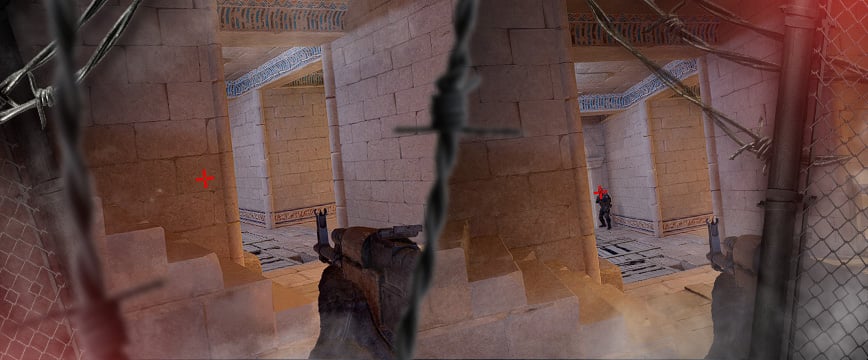
Here are some examples of the gameplay of İsmailсan “XANTARES” Dörtkardeş, one of the most famous players in the world. He is known for his incredibly fast kills, which often catch even well-positioned players off guard.
Here is one of many videos showcasing XANTARES’s signature style in action, as he decimates his opponents with a series of lightning-fast kills.
CS2 (CS:GO) Shooting Techniques for Accurate Headshots
Aim improvement in CS2 heavily relies on shooting mechanics, which enable you to hit headshots in various situations. Professional players often demonstrate the ability to hold down the mouse button and eliminate multiple enemies in different locations. This skill is achieved through spray control, which requires extensive practice.
Shooting in CS2 can be divided into three types:
- One tap
- Short burst
- Spray control
One tap is a term used in gaming when you make a single, well-placed shot to your opponent’s head, resulting in an instant kill. It gives you a significant advantage, not only by eliminating an enemy player but also by preserving almost all of your ammunition. It allows you to use those bullets to eliminate other enemies.
However, the biggest advantage of one tap is that the first bullet always flies straight to the center of your crosshair. It means that if you are confident that you can quickly peek and make a headshot, this technique is highly effective. Here are some of the most famous examples of one tap in the world.
Short burst is a firing technique commonly used to improve accuracy and reduce recoil. If you haven’t mastered recoil control, it’s best to fire short bursts of 5-7 bullets, which can potentially kill an opponent. After each burst, take a short pause to regain control of your weapon before firing again.
This technique is most effective when you are engaging an opponent at a range and have time to take cover between bursts. It allows you to peek out and fire a short burst at the opponent’s head, dealing significant damage. It is a highly effective tactic that professional players often use.
Another popular use of short bursts is to shoot through smoke grenades. It can reveal the position of enemies hiding behind the smoke. It’s best to shoot at the edges of the smoke rather than the center, as the smoke is more concentrated in the center and makes it difficult to see anything. Shooting at the edges gives you a better chance of spotting enemies.
The third most difficult shooting mechanic is spray control. It requires a lot of training to memorize the bullet spread pattern, how to properly hold and move the mouse to compensate for weapon recoil, and to remember the recoil pattern of each weapon and try to control it. It is very difficult and will take you an incredibly long time to learn. However, it will also give you a huge advantage, as almost all of your rifle shots will hit the opponent.
Here are two examples of the most popular weapons: AK-47 and M4A1-S.
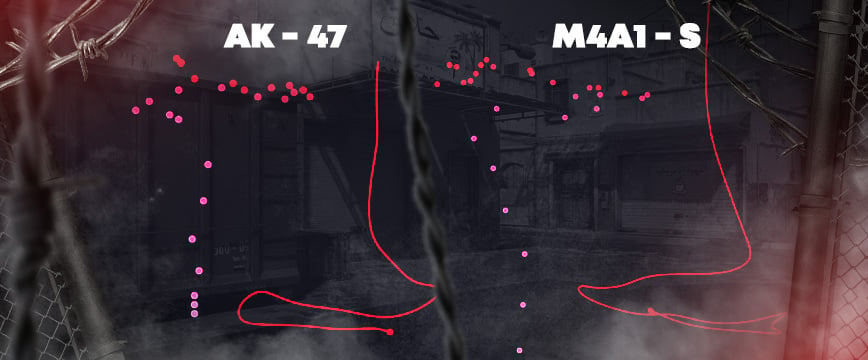
In these examples, the left side shows where the bullets will go if you hold down the left mouse button, and the right side shows how to move the mouse to minimize weapon spread and improve accuracy.
Detailed information about other weapons can be found here.
You can also practice recoil control on special maps in the Steam Workshop. All you need to do is find a map like this and try it out.
Improve CS2 (CS:GO) Headshot Accuracy Through Training
The last piece of advice that will work best of all is, of course, practice and training. It is not enough to play Deathmatch for 10 minutes and say that you are ready for the game. No, you will not be able to achieve real success that way. To play well, be successful, and be the best in the game, you need to train and train again.
It is difficult, but it will give you the most results. Follow the previous instructions and train on CSStats Training Map (CSGOHUB), Aim Botz – Aim Training (CS2), or other convenient maps, but you must do it.
There are also special Deathmatches for headshots only to improve your aim in CS2. All you need to do is open the game, then follow this link, select the desired server, and click Join, after which you will be transferred to another window where you just need to confirm the transition to the server. That’s it. Go into the game because everything is downloaded to the server for you.
It’s easier to do than to describe it all, so be sure to try this mode. It will definitely give you a lot of experience, and you will be able to shoot better.
Take a look at how Håvard “rain” Nygaard plays. This player is just a headshot god. In the last three months, he has the highest headshot percentage, 65% of 465 kills. And that means he made 302 kills in the head, incredible, isn’t it? And you can do the same, just train, and in time, you will become a real killing machine.
Best CS2 (CS:GO) Aim Trainers
We have already shown you several maps that you can use to train, but this list can be expanded and more detailed. Now, we will discuss what exactly can help you train your aim.
First, try the popular Steam game “Aimlabs“. It takes up very little space on your computer and can be installed in just a few minutes. When you enter the game, select which shooting skills you want to train for CS2, and the game will offer you several interesting levels in which you need to shoot at targets.
You can compete with other players for speed, challenge friends, and choose any of the hundreds of workouts presented, which will definitely help you get a better feel for the mouse, track targets, react quickly, and much more. This game even has a special test, after which the game will automatically tell you your weaknesses and give you some recommendations on how to improve.
Also, don’t forget about the above maps:
You can choose any weapon you want to train with and practice making precise and accurate headshots here. On the first map, CSStats Training Map (CSGOHUB), there is even a special option to make bots that will only die from a headshot, giving you an extra incentive to aim better.
S1mple, ZywOo, ropz, NiKo, broky, apEX, and other players play on these maps and train their shooting skills daily. If they have an important match to play, players try to spend at least 20 minutes headshotting bots to get used to the mouse and all the surrounding factors in order to improve their shooting and reach the desired level.
Best Tips For Landing Headshots In CS2
The most important advice we can give is to apply everything mentioned above—from mastering crosshair placement and refining your settings to understanding map angles and practicing consistently. These are the foundations of improving your CS2 (CS:GO) headshot accuracy.
Another often-overlooked strategy is reviewing your own gameplay. While many players find watching replays boring, it’s actually one of the most effective ways to spot weaknesses in your aim, movement, and decision-making. Watching past matches helps you better understand enemy timings, positioning, and what led to missed CS2 headshots or misplays.
We recommend reviewing at least two of your own games:
- One where you were performing at your best
- One where you struggled to hit shots
By comparing both, you’ll quickly notice small but crucial habits that affect your performance. Identifying what worked and what didn’t will help you build consistent Counter Strike headshot techniques and avoid repeating mistakes.
You should also study pro gameplay. Watching professional players like s1mple, karrigan, and ZywOo in action can be incredibly helpful. Focus on their headshot angles, pre-aiming habits, and positioning during duels. Even better—watch first-person POV streams or demos, where you can observe their exact mouse movements, crosshair control, and peek timing.
karrigan, for example, shares a lot of educational content on his YouTube channel. He reviews subscriber gameplay, analyzes CS2 (CS:GO) headshot stats, discusses team strategies, and provides live commentary from team matches with voice comms. It’s a great way to understand not only how to aim for the head in CS2, but also how to think like a top-tier player.
If you want to become a true headshot machine in CS2, learning from your own mistakes—and from the best—is key.
Conclusion: Become a Headshot Machine in CS2 (CS:GO)
Mastering the CS2 (CS:GO) headshot isn’t just about reflexes—it’s about understanding game mechanics, positioning, and developing consistent aim through proper training. From adjusting your crosshair and video settings to practicing one-taps and analyzing pro players, every detail contributes to your improvement.
By following the techniques outlined in this guide—like perfecting your spray control, optimizing your crosshair for headshots, and reviewing your matches—you’ll quickly see a rise in your CS2 headshot stats. Pair that with dedication and practice on aim maps or headshot-only servers, and you’ll develop the skills to dominate rounds with clean, fast eliminations.
Remember: every Counter Strike headshot starts with preparation. So set your settings, train smart, and get ready to top the scoreboard, one headshot at a time.
FAQ
Currently, the headshot percentage in CS2 is quite high, at around 61%. Compared to the previous version of the game, CS:GO, where the percentage was 55%, it is significantly noticeable that players have become better at shooting and aiming.
Over the past three months, Håvard “rain” Nygaard has had an incredible headshot percentage of 65%. Out of his 465 kills, 302 of them were headshots.
Yes, but your accuracy will be significantly reduced. If you want to hit your shots accurately, you need to hold down Shift while shooting, or simply stop moving. This will ensure that you hit your target with precision.
To check your CS2 (Cs:GO) headshot stats, go to your CS2 profile and click on the “Stats” tab. You’ll see your headshot percentage listed there. Alternatively, you can use third-party sites for more detailed headshot analytics.
To get headshots in CS:GO, keep your crosshair at head level, practice your aim on maps like Aim Botz or headshot-only Deathmatches, and use one-tap or short burst fire for better control. Learn map angles, pre-aim common spots, and tweak your crosshair and sensitivity for more precise shots. Consistent training is key to landing more headshots.
A good headshot percentage in CS:GO is typically around 40% to 50%. Casual players often average 30–40%, while skilled or competitive players aim for 45% or higher. Pro players or headshot-focused aimers may reach 60%+, but anything above 50% is considered excellent.
Ask ChatGPT
To join a headshot-only server in CS2, open the game, click on “Play” > “Community Server Browser”, and type “headshot only” in the search bar. Choose a server from the list and click “Connect”. You can also find headshot-only servers on third-party platforms like FACEIT or custom training maps via the Steam Workshop.
To improve your headshot accuracy in CS:GO, try aim training maps like Aim Botz – Aim Training, CSGOHUB Training Map, and Recoil Master – Spray Training from the Steam Workshop. You can also join headshot-only Deathmatch servers through the Community Server Browser for real combat scenarios. For more focused practice, use Yprac Aim Trainer or map-specific Yprac maps to sharpen your pre-aiming and crosshair placement skills.
Headshots in CS2 (CS:GO) can be instant kills, but it depends on the weapon used, the enemy’s armor, and distance. Weapons like the AK-47 or Desert Eagle can instantly kill an armored enemy with a single headshot. However, pistols like the Glock-18 or USP-S may not guarantee a one-shot kill against helmets, especially at long range. Always consider weapon damage, range modifiers, and armor penetration when going for headshots.
No, headshots don’t give extra points by default in CS2 scoring. Points (or money rewards) are based on the weapon used and whether the kill was made, not the hit location. However, headshots are often the fastest way to secure kills, especially with powerful weapons like the AK-47, so they can help you win rounds and improve your overall stats, including your headshot percentage.

Radosław Davidović is Hellcase’s customer success manager. He enjoys blogging to share his knowledge and experience with customers.