
What Is A Steam Card & How Does It Work?
 el-pollo-diablo
Want to purchase on Steam but don’t know how to do it? Or, for example, help a friend to buy a game on Steam to play with him? It’s simple: use a Steam card for such tasks. In this guide, we will describe what a Steam card is and explain how to buy and use it.
In article you will find:
What is a Steam Card?
A Steam Card is a gift card that can be used on the Steam platform to top up your account balance or purchase games or other items. You can buy a card for yourself or another user as a gift. The recipient of the card will receive an activation code that they can use to receive the game or money on their Steam account. It sounds pretty simple, but there are some nuances.

How do Steam Gift Cards Work?
Steam cards act like a certificate that you can use after receiving them. The important thing is that you cannot use the money on your Steam Wallet balance. You can purchase these cards through your bank card, Visa or Mastercard.
There are two Steam Card types: Digital Steam Card and Physical Steam Card (Wallet Code).
But what is the difference between them? What variant to choose and how to buy it?
How to Buy a Digital Steam Card?
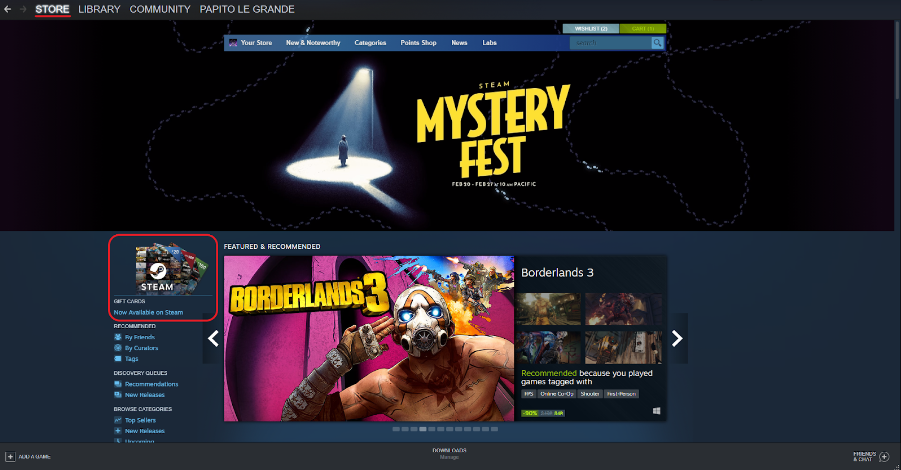
Digital Steam Cards can only be purchased as a gift for another account. You can buy this card online directly on Steam. To do this, go to the Store tab. On the left side of the page, you will see “Steam Gifts Cards“. Click directly on the icon.
It will redirect you to the Steam Gift Cards page. Here you can learn more about Steam Gift Cards, but we are interested in buying, so click on “Send through Steam”.
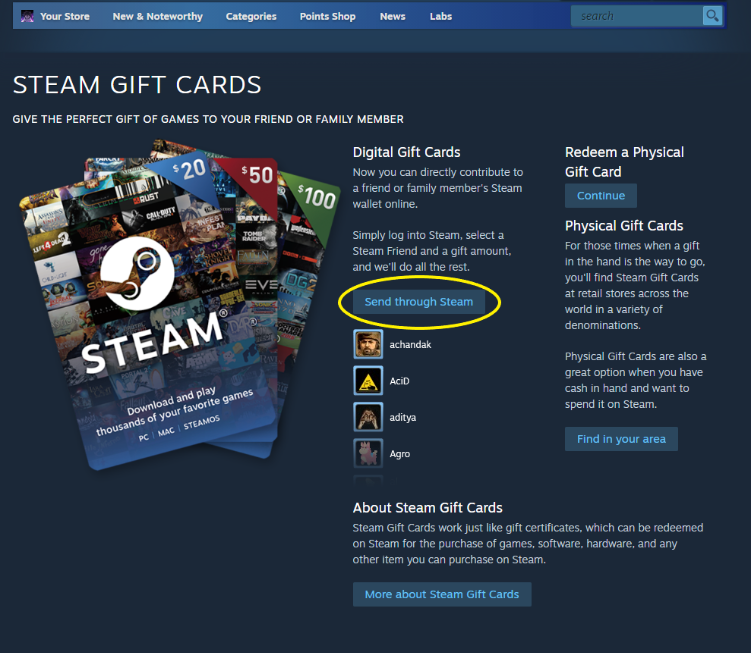
Then the buying process begins. First, you need to choose the amount of the gift card. You have five options: a $5, $10, $25, $50, and $100 gift card. You take the option you need, and you will see a list of your friends in Steam. Select the account you need and click continue.
Next, you need to fill out a note to the recipient. You need to fill in all the fields, and only after that, you can continue.
After, choose the payment method convenient for you and fill in the billing information. Later confirming the payment, Steam will send a message about the received gift to the recipient’s account. After the recipient’s acceptance, the system will automatically credit funds to his balance. In case of refusal, all funds spent will be returned to the sender.
It’s all about the digital gift card. Things are a little different with a physical gift card (Wallet Code).
How to Buy a Physical Steam Card?
Physical Steam Cards and Steam Wallet Codes are sold across the globe. You can buy them in thousands of retail stores or online shops using your local payment methods. Steam has a list of regions in which you can purchase this card. Go to the Steam Gift Cards page as shown above and click “Find in your area”.
Find your region in the list and see which retailers stores, and online shops where you can purchase the Steam Wallet Code.
If you have already purchased this card, you can activate it or give your friend the activation code.
How To Activate a Physical Steam Card or a Wallet Code?
If you bought a Physical Steam Card, first look for the code itself. You can find it on the back of the card. If you purchased a Wallet Code online, then you should receive an email with an activation code.
To get to the activation first, go to the Steam Gift Cards page, as we showed you earlier. Under the inscription “Redeem and Physical Gift Card”, click Continue.
It immediately redirects you to a page where you can see the line to activate your code. You can use a gift card in another currency, and it will automatically convert to the currency of your region. But pay attention that you can’t redeem all gift card currencies in all regions.
Wrapping Up!
The purpose of Steam cards is quite simple: it is a convenient way to pay and top up the account for yourself and your friend or family member. You do not need to transfer funds between bank cards. You can top up your friend’s balance with just a few clicks.
As for physical cards, this is the safest way to replenish your account balance. Even if you make a mistake when entering the activation code, you can still enter it again without losing anything. But you must admit that it is more pleasant to give gifts rather than take them.
Keep reading our blog and be updated!
FAQs
No, these funds have value only on the Steam platform.
You can buy this card to replenish the account balance on Steam. These funds can be spent on the purchase of games, DLC in-game items, and other things on the Steam platform.
You need to enter the card activation code located on its back. To do this, log into Steam, in the upper right corner, and click on “View My Wallet”. There you will see a line into which you need to enter your code.
If you have received a Steam Gift Card, just accept the gift, and the card funds are automatically accrued on your balance.
Steam cards are used to add funds to a Steam Wallet, which can be spent on games, DLC, and other content.
Steam game cards are collectible digital cards earned by playing games, used to craft badges and earn rewards.
Yes, you can buy digital Steam gift cards directly through the Steam store.
Go to “Account” → “Redeem a Steam Gift Card or Wallet Code”, then enter the code.
Someone asking you to buy a Steam card is usually trying to scam you. Scammers often request Steam cards because they can quickly convert the codes into money or trade them anonymously. Legitimate businesses or government agencies will never ask for payment through Steam cards.
Yes, Steam gift cards are still widely available. You can find them in many physical retail stores like Walmart, Target, and GameStop, as well as online through authorized sellers such as Amazon or Best Buy. Availability may vary by region.
Yes, but regional restrictions may apply based on currency and country.

El Pollo Diablo is the author of articles and game guides. He knows the answers to all your questions about game mechanics, updates, and tournaments.