
Best CS2 (CS:GO) Crosshairs Used by Pros, Settings & Codes
 riley-st-john
Alright, sharpshooters (and not-so-sharpshooters)! Do you want to finally start aiming like a professional CS2 player and never miss your in-game shots again? Well, you’re in the right place.
In CS2, the right crosshair can be a game-changer, especially when it comes to improving your accuracy and precision. Professional players don’t just get lucky with their shots—they rely on carefully customized CS2 (CS:GO) crosshairs to take their gameplay to the next level. Whether you’re looking to replicate the crosshairs of your favorite pro or create a personalized setup, this guide has everything you need.

In this Hellcase guide, we will explore the best CS2 (CS:GO) crosshairs used by top-tier pros and streamers. You’ll learn how to copy their crosshair settings, discover the key settings behind their perfect aim, and see how to fine-tune your own setup using CS2 crosshair codes. From adjusting thickness and gap to choosing colors and styles, we’ll walk you through the entire process so you can craft a crosshair that suits your playstyle.
So, are you ready to aim like a pro? Dive in and unlock the secrets to mastering your CS2 (CS:GO) crosshairs today!
In article you will find:
Types of CS2 (CS:GO) Crosshairs
Someone might tell you that a crosshair is just a few colorful pixels in the middle of your screen. While it’s true, a CS2 crosshair is much more than a mere targeting tool. It’s your trusty sidekick in the heat of battle, helping you hit your shots with precision!
From sleek and simple to dynamic designs, there’s a whole spectrum of CS2 crosshairs to choose from. Here’s a closer look at the different types of CS2 (CS:GO) crosshairs that can transform your gameplay from ‘meh’ to ‘wow’!
- 1. Static CS2 Crosshairs
Static crosshairs are classic and reliable. They don’t change size or shape when you shoot in-game, providing a consistent aiming point no matter what. These are perfect for players who value precision and stability. If you’re looking for one of the best CS2 crosshairs for consistent performance, static is the way to go.
- 2. Dynamic CS2 Crosshairs
Dynamic CS2 crosshairs expand and contract based on your movement and shooting. It’s like having a visual coach telling you, “Hey, you’re moving too much for an accurate shot!” This feature is great for beginners learning the ropes of movement accuracy and adjusting to dynamic in-game scenarios.
- 3. Dot CS2 Crosshairs
Dot crosshairs are simple dots (“•” instead of the regular “+”), perfect for sharpshooters who rely on pinpoint accuracy. They’re ideal for those who want to focus on precise, small targets. However, dot CS2 crosshairs can be tricky in chaotic firefights – it’s easy to lose that tiny dot in the heat of the moment.
These are the main types of CS2 crosshairs you can use in your game. Your CS2 (CS:GO) crosshair settings should be a personal mix of art and science. Adjust the center dot, size, thickness, gap, outline, and colors to create an aiming tool that’s both visually appealing and deadly efficient. Next, we’ll explore how to customize these CS2 (CS:GO) crosshairs to fit your style.
CS2 (CS:GO) Crosshair Settings Explained
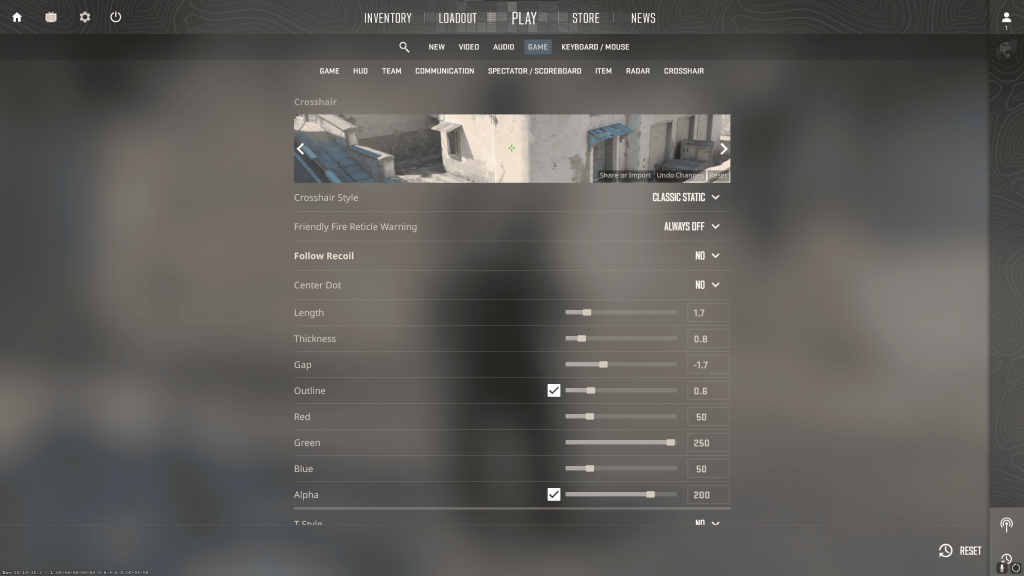
You can customize your crosshair for (CS:GO) CS2 in many ways. The settings should be a personal mix of art and science. Adjust the center dot, size, thickness, gap, outline, and colors to create an aiming tool that’s both a joy and deadly efficient. These settings are like the secret ingredients in your gaming recipe – tweak them right, and you’re on your way to a feast of frags!
H3: Center Dot, T-Style
The center dot is the focal point of your aim. In CS2, you can adjust its presence for better targeting. Some players love a center dot’s precision, while others find it obstructive. Play around with it to see if it sharpens your aim or just gets in the way.
Enable the T-style if you want to remove the top part of your crosshair. It might be useful in some cases and help you aim better.
H3: Size, Thickness, Gap
The size of your crosshair can significantly impact your aiming. Too big, and it might obscure your target; too small, and you might lose it on the screen.
A thicker crosshair can be easier to focus on but might block your view of smaller targets, especially when trying to eliminate the in-game opponents on longer distances.
The gap in the center of your crosshair is crucial for sighting. A bigger gap gives a clear view of your target, but a smaller gap can enhance precision.
H3: Outline, Colors, Opacity
An outline can help your crosshair stand out against different backgrounds.
Bright colors like neon green or hot pink often stand out best. It’s like choosing the color for your sports car – you want it to be noticeable and something you love looking at. The right balance of color intensity and transparency can make a big difference. You want your crosshair visible but not distracting.
Counter-Strike 2 introduced the “Follow Recoil” crosshair option. When enabled, it makes your crosshair move with recoil during shooting, showing its impact on the aim. However, it doesn’t factor in spray or movement inaccuracy, only recoil. This feature benefits new players unfamiliar with Counter-Strike recoil patterns, aiding in understanding weapon response and building the necessary muscle memory for aim consistency.
The beauty of CS2 (CS:GO) crosshairs lies in the mix-and-match possibilities. Combine static and dynamic elements, play with shapes and colors, and find that perfect blend that feels just right.
Best CS2 (CS:GO) Pro Crosshairs
Have you ever wondered what CS2 (CS:GO) crosshairs pros use? Here’s a secret: many pro players opt for simple, static crosshairs because they offer consistency and precision. No frills, no fuss, just pure aiming excellence.
The table below shows the 2023/2024 CS2 (CS:GO) crosshair codes of some of the most popular professional players. Grab them for a test drive now!
| s1mple | CSGO-w8oZm-tDYrj-PbCFm-rs6QV-OSc3K |
| NiKo | CSGO-Cc5CX-EFvks-f7DR8-7BASW-zqLDR |
| m0NESY | CSGO-AAtxe-zWUrD-YuE8z-VeEX8-uWXTB |
| b1t | CSGO-Umk5s-uxPQA-eDfJW-qWMyR-znjPK |
| Twistzz | CSGO-LuCFE-SwzOQ-z8Kxz-YPZA2-KS8SA |
| ZywOo | CSGO-Umk5s-uxPQA-eDfJW-qWMyR-znjPK |
| ropz | CSGO-tMcGZ-7dsrt-w7Mor-rZv2M-ey3JE |
| XANTARES | CSGO-m9emD-M7m5P-4wib8-DnX2W-Bkb3K |
| device | CSGO-JkikR-hKdC9-8NZkm-5C7Ek-v5BYN |
| kennyS | CSGO-uS4Vm-DRWHr-CVvFA-OZpMu-VtjjD |
| electronic | CSGO-7NTRE-tYyoU-SNQss-zbwjT-fxwPB |
| YEKINDAR | CSGO-OvBVX-xeCAn-Qt2Dk-cp8Lc-H7xDK |
| w0nderful | CSGO-Yrjf7-uKcba-APCZX-aX2T7-RjG4C |
| jL | CSGO-GzSX2-wph8Z-nEtCn-iNSBw-cEKeB |
| iM | CSGO-hQjbA-kNS33-avm23-8rcxP-cjRqJ |
| Aleksib | CSGO-fJuKk-iQHe3-LaZ3E-KxztJ-DqmHB |
| Krimbo | CSGO-V4rWu-kdVWN-HoORW-mWecW-P4D7K |
| frozen | CSGO-9Wfur-Spe6Q-rCZLn-mvth5-zHnfO |
| Jame | CSGO-fYRbG-ZrOQC-Niw4b-8bZFh-n6QmH |
| EliGE | CSGO-zp7H4-BWPNU-BYFCu-3Wc5x-CtqRP |
| FL1T | CSGO-fJuKk-iQHe3-LaZ3E-KxztJ-DqmHB |
| broky | CSGO-yJWW7-ZEQxt-5eGRo-uey4d-MaMbM |
| tabseN | CSGO-oU2Mt-3Fqfy-zNzqF-BeHCb-WLCEB |
| torzsi | CSGO-Xu6h8-vZDGX-zYqfR-tqbdd-PRX9G |
| floppy | CSGO-bPCHW-QE9T8-BiTdO-VUro6-ihaAB |
| xertioN | CSGO-4em7N-OeKtB-XxLPB-vCWH6-uWXTB |
| mantuu | CSGO-LRVYt-ayuvx-KZEXn-ZdZRu-RPNMB |
| rain | CSGO-YD3GU-BrVxt-5eGRo-uey4d-MaMbM |
| sdy | CSGO-qvovZ-Q23xT-Wz6UA-3VoEJ-zPFuA |
| mezii | CSGO-jnGVW-ZMAeP-piAqt-ZxjXy-OrGSQ |
| kRaSnaL | CSGO-4a954-cxOkF-KtWjh-BMsLR-HiTiA |
| br0 | CSGO-3xF36-jQavn-Mdy3f-HDNTM-s5qRP |
| Spinx | CSGO-msEjS-UwrbB-HzVzV-SaXWn-Xk2AC |
| dupreeh | CSGO-TUaEk-iLnd4-Zni29-POK6y-iKH8D |
| Apex | CSGO-9pxCX-mwpbb-Kzijk-J6hiw-4jdBN |
| flameZ | CSGO-vEbTj-ZYeqj-MmwvT-DnWrs-AR3ED |
| cadiaN | CSGO-e7cwa-x67fi-pypuf-OcPE6-Jo74E |
| sjuush | CSGO-RQz44-WFhiG-eO3uV-97NyB-CrrBE |
| TeSeS | CSGO-Gji8n-hnEBV-CDAkX-zzeeC-WbxTC |
| Grim | CSGO-zjqOz-HUR6Y-mPScY-OVHq2-WsdqA |
| Ax1Le | CSGO-5LifJ-6yjCj-WVRkB-ja5UR-ExLDR |
| Woro2k | CSGO-eomfW-Zi5do-6CFye-wueDp-UxQRO |
| SunPayus | CSGO-pDiAJ-e255U-9OFad-Q5QMh-xGCEB |
| maden | CSGO-4kvfb-SNPnH-YTNOt-d2OnM-QGKeB |
| gla1ve | CSGO-2qmBv-qFzZ8-ENsSU-cJiJf-rWDND |
| DemQQ | CSGO-yRzoc-J9Bsq-ie7Nx-Fwocb-hej5P |
| Perfecto | CSGO-3OVYd-jsyJX-yXOO9-YUiqJ-TpNkO |
| fame | CSGO-bPCHW-QE9T8-BiTdO-VUro6-ihaAB |
| mir | CSGO-ObBqB-wKKqQ-GWKcT-WbHF6-JrhrM |
| HObbit | CSGO-utjrU-sUsqL-OyzXN-DWCDX-5bq3B |
| siuhy | CSGO-5JrrW-C9oYe-Htpjp-9dMsm-xGCEB |
| karrigan | CSGO-Vk7Cz-XXVk2-ZcZZu-F7CoJ-AzZkF |
| headtr1ck | CSGO-oMWM5-34C83-RXqHY-78PpM-nKbEC |
| donk | CSGO-qnD6M-ytJKu-ecbnu-fqLzq-4jTiA |
| deko | CSGO-E5JFP-wGmoC-enbRj-DhjsM-WYXTB |
| nawwk | CSGO-Yrjf7-uKcba-APCZX-aX2T7-RjG4C |
| refrezh | CSGO-Ap5Wy-SBKH6-hDYpP-foTH6-Q9eyC |
| Altekz | CSGO-KWcCJ-JNJbX-xEKEp-qdFMN-aUeuB |
| olofmeister | CSGO-9HPjP-jfFYj-hYor7-Ka7Bo-OBrmJ |
Have you found the CS2 crosshair codes of your favorite players in the table above? Try playing with them!
Best CS2 Crosshairs Used by Streamers and Content Makers
Now, let’s talk about the crosshairs your favorite streamers and content creators use daily. Many streamers opt for bold and vibrant crosshairs so that viewers can easily spot them on different devices with various resolutions and quality settings.
Some CS2 streamers and content makers prefer the minimalistic approach for a cleaner look of their crosshairs, while others go for something more elaborate. Popular streamers often set trends with their crosshair choices. When a well-known personality uses a particular style, it can quickly become a fan favorite.
| shroud | CSGO-EMBT5-ahHqB-ssKUF-Ymx7z-LeOUD |
| Maniac | CSGO-UNHXt-fLjKd-N72EP-XhpkP-zj9aC |
| AdreN | CSGO-97GZ7-Cw25y-vjrMu-3B7FA-8MUnB |
| gAuLeS | CSGO-8N3X3-pW7AW-dxw3R-HkXkY-o2OtQ |
| pashaBiceps | CSGO-mmQZt-djm3d-TeLXo-TC7Sr-7cG4C |
| Hiko | CSGO-YPpNQ-TGNYG-YNDXX-ydb95-2sCJC |
| GeT_RiGhT | CSGO-WaJwT-OLPAJ-j8L4t-R3czv-rx8CH |
| Maikelele | CSGO-UaUBC-wtq7E-FF2yF-Zbii9-onYbD |
| FURIOUSSS | CSGO-VJVT3-YwNFH-52Z42-Pi4fM-2zpxA |
| FlipiN | CSGO-9Pn2X-TdvZ5-Vi3OO-ekqpN-oJpxA |
| Znorux | CSGO-iGk9q-XjjvU-yG9wf-d6rWO-a9nQD |
| n0thing | CSGO-jirdx-5Pexw-huyrY-oDhSL-2Oc7L |
| ren | CSGO-6T99R-QPvhm-Y7tVz-rxwRR-hEpEM |
| Austin | CSGO-bymFH-HjoEY-pd3UK-9iAXE-iZOAK |
| Stewie2k | CSGO-uzTy4-6wJNL-SCASE-Koabj-TsKjC |
| fl0m | CSGO-Y4MJG-57QD5-pOaFv-4kkkf-K564E |
| flusha | CSGO-7fiF7-XSWuf-UG92q-yV8WL-TA7yD |
| HeatoNcs | CSGO-K88KN-8kGCb-vdq9s-hPXpi-SLLTK |
We’re sorry if you could not find the streamer you were looking for on our table! Try asking for their CS2 (CS:GO) crosshair code in chat or search for it in their channel description. Many streamers have automated bots that share their configs and setups when you use a corresponding command in chat.
5 Best CS2 Crosshairs for Beginners
New to the Counter-Strike series? No worries! We’ve got you covered. Here’s a list of the top beginner-friendly crosshairs for (CS:GO) CS2 newcomers.

To try them, copy the codes from the table below and insert them in your in-game settings.
| Crosshair #1 | CSGO-WQkTe-2O9LP-XhdUQ-RM7Mu-ENc7L |
| Crosshair #2 | CSGO-ZO4CX-K6eri-RutBb-yx2PK-wQ47M |
| Crosshair #3 | CSGO-mpB5j-KNiOh-xHhda-ENHYC-nn7SA |
| Crosshair #4 | CSGO-p4aoe-ZWZoF-amCxQ-BCPFc-nBnkP |
| Crosshair #5 | CSGO-PKQXT-w3tj2-94rXx-ibzc9-oGFdH |
In addition to customizing your CS2 crosshair, don’t forget to adjust your sensitivity settings. A lower sensitivity offers more control over your mouse movement, but if you’re working with limited desk space, you might need a higher setting. For more on sensitivity, check out our CS2 mouse sensitivity guide!
Remember, your aim consistency can also be affected by unstable performance or low FPS. Learn how to display your FPS in CS2 and see if you need to optimize your system’s performance.
We have a wealth of in-depth guides on our blog to help you along your CS2 journey. Be sure to check out our guide on the best CS2 settings to get the most out of your game!
How to Import CS2 (CS:GO) Crosshair Codes
Did you find a cool CS2 (CS:GO) pro player crosshair or get one from a buddy? Crosshair codes allow you to export your settings or import someone else’s effortlessly.
Here’s how to try the best CS2 (CS:GO) crosshairs from our guide. Once you’ve copied the CS2 crosshair code from one of our tables or another place, go to your in-game settings and find the “Game” tab.
Then, scroll down to the section with the crosshair settings and click the “Share or Import” button on the preview. After that, a pop-up window will appear, allowing you to paste the crosshair code from the clipboard or copy the one you have right now.
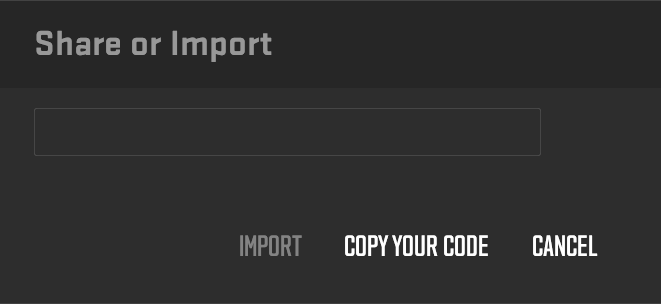
Something went wrong? Don’t worry, you can always return the previous crosshair by clicking “Undo Changes” next to the “Share or Import” button. If you decide to experiment with crosshairs, we recommend you save your favorite codes somewhere to avoid losing them.
You can also import a crosshair code through the Developer Console. Open the console, type in the “apply_crosshair_code” command with the desired code, and press Enter.
Another way to import crosshair settings to your account is by downloading a player config from a reliable source. See how to transfer CS2 config.
How to Copy CS2 (CS:GO) Crosshairs In-Game
Did you know you can copy another player’s crosshair during a match? Yup, that’s right! If you spot a crosshair you like while spectating, just a few steps, and it’s yours.
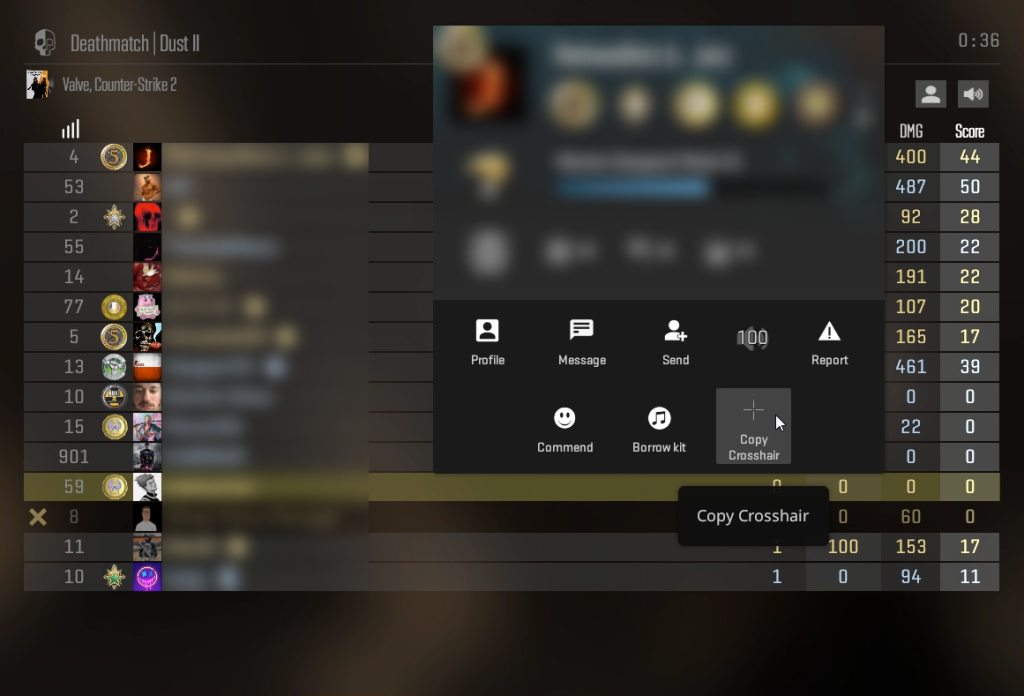
We’ll go through how to do this:
- Press ‘TAB’ to open the Leaderboard;
- Right-click to enable the cursor;
- Pick the player whose crosshair you wish to copy;
- Click ‘Copy Crosshair’ in their profile preview.
After that, the game will ask you if you want to replace your current crosshair with the one you just copied. Press “Yes” if you want to proceed.
Wrapping Up!
Choosing the right CS2 (CS:GO) crosshair is crucial for enhancing your accuracy and overall gameplay. Whether you prefer the consistency of a static crosshair, the movement feedback from a dynamic one, or the pinpoint precision of a dot, the ideal setup ultimately comes down to your personal style and comfort. Don’t forget to fine-tune your CS2 (CS:GO) crosshair settings and adjust other factors, like sensitivity, to suit your playstyle.
By selecting the best CS2 crosshairs, you’ll take your aiming skills to new heights and play with greater confidence. Start customizing your crosshair today with pro players’ CS2 (CS:GO) crosshair codes and experience the improvement in your performance.
Explore Hellcase Blog for more content about CS2 skins and other cosmetics, in-depth game guides, and esports news. Stay tuned!
FAQ
The best CS2 crosshair is the one that you’re most comfortable with. It varies from player to player, so feel free to experiment! You can customize the crosshair by tweaking the settings in your game or find crosshair codes of famous pro players to test drive. Read more in our guide!
A suitable CS2 crosshair can significantly improve your aiming and overall gameplay experience. Sometimes, it can help you aim better and be a more consistent shooter. Experiment with static and dynamic crosshairs, thick and thin, with or without an outline or a center dot.
Importing crosshair codes is easy in (CS:GO) CS2! Go to the “Game” tab in the settings menu and scroll down to the crosshair section. In the left bottom corner of the crosshair preview window, press “Share or import.” Paste the code from the clipboard to the pop-up window’s input, or click “Copy your code” to get yours.
The best CS2 crosshairs have high contrast against most of the in-game environment. Try using vibrant colors like green and cyan for the best visibility. Enable outline to spot them even better. Also, avoid using black, red, yellow, and white colors for your crosshair.
Many pro players opt for simple, static crosshairs because they offer consistency and precision. For example:
s1mple — CSGO-w8oZm-tDYrj-PbCFm-rs6QV-OSc3K
NiKo — CSGO-Cc5CX-EFvks-f7DR8-7BASW-zqLDR
m0NESY — CSGO-AAtxe-zWUrD-YuE8z-VeEX8-uWXTB.
Get crosshair codes of other pro players and CS2 streamers from our guide.

Average CS enjoyer. Knows everything about CS skins, including which ones will suit your weapons best.