


siuhy CS2 settings
Kamil “siuhy” Szkaradek (born August 26, 2002) is a Polish CS2 IGL. He currently plays for Team Liquid. The player is known for his tactical mind and aggressive playstyle. siuhy is a player who takes risks that often lead to decisive plays. Kamil Szkaradek is also considered as one of the best young IGLs in the international competitive scene. He led Team GamerLegion to a solid 2nd place finish at BLAST.tv Paris Major 2023 and MOUZ to 3rd-4th place finish at the Perfect World Shanghai Major 2024.
siuhy CS2 settings Crosshair
These settings feature an ultra-thin crosshair. It is designed for accurate headshots and maximum sightline visibility. The core lies in the combination of Length (2), Thickness (0), and Gap (-3). This zero-line thickness gives siuhy a crosshair that never obscures small target pixels. Also, it is possible to create an exact center aim point due to the Gap (-3), which pulls the bars close together. Another important detail is that Dot is disabled while the Follow Recoil feature is off. It ensures that the crosshair stays uncluttered and completely static during spray control.
No less important is the coloration of the crosshair. siuhy chooses the Green (RGB: 0, 255, 0). Also, the player sets the Alpha Value to 200, which makes the crosshair lines slightly transparent. It is also highly readable, standing out against any background.
CSGO-Xi4NX-WUD8O-kRLD7-JJrYj-EGnfO
siuhy CS2 settings Mouse
siuhy uses a low-sensitivity configuration. His 400 DPI, combined with a 1.7 sensitivity, results in 680 eDPI. This combination gives the player a window for error. It makes long-range micro-adjustments, recoil control, and headshot tracking remarkably consistent. And a 4000Hz polling rate greatly reduces sensor latency, so the cursor movement will be smooth. In the end, using standard Windows Sensitivity (6) ensures raw 1:1 mouse input.
siuhy CS2 settings Viewmodel
These viewmodel settings create a setup that maximizes visibility. It is possible due to the FOV 68. In combination with Offset X (2.5), it pushes the weapon model as far to the right edge of the screen as possible. Also, by using Offset Z (-1.5), siuhy moves the rifle down toward the bottom frame. The player chooses Presetpos 2, which is the wide-angle preset. The last detail is setting Bob to False. It completely turns off weapon motion during movement or shooting. In other words, the center part is clear and unobstructed, while the weapon model doesn’t distract siuhy during the game.
viewmodel_fov 68; viewmodel_offset_x 2.5; viewmodel_offset_y 0; viewmodel_offset_z -1.5; viewmodel_presetpos 2.
siuhy CS2 settings Video settings
siuhy prefers settings that provide 1080p native visual clarity with high brightness, clear corner shadows, and low input latency for responsive gameplay. Unlike many pros, the player chooses a 1920x1080 native resolution (16:9). It gives him unstretched visuals with crisp target outlines and no pixel blur. siuhy also sets Brightness to 126%, combining it with enabled Boost Player Contrast. It guarantees that the player won’t miss an opponent in any dark corner or shadowed area.
He also reduces system latency, enabling NVIDIA Reflex Low Latency and keeping the GPU and CPU synchronized. At the same time, the combination of disabled V-Sync and G-Sync and uncapped Maximum FPS (0) ensures unbuffered frame delivery. siuhy also sets a high Global Shadow Quality to notice player model shadows around corners instantly. In the end, to maximize performance, the player sets CMAA 2, Anti-Aliasing, Bilinear Filtering, and low Textures/Shaders.
siuhy CS2 settings Launch options
Launch options are part of settings you can specifically set directly in Steam. For a better understanding, they configure how the game engine initializes. For example, one of the options is -console. By adding this launch option, the game automatically opens the developer console every time you launch it. Most of these options were important for CS:GO to get a smoother, more stable experience, while in CS2 you can use a few, like capping FPS or forcing a specific monitor refresh rate.
-freq 360 -novid -console -tickrate 128 -allow_third_party_software
siuhy CS2 settings Skins
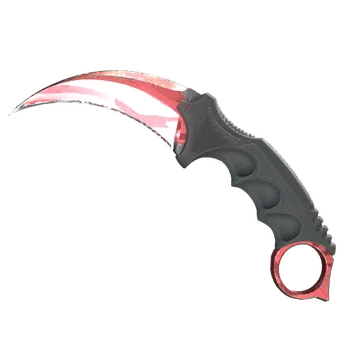
siuhy is one of the pros who prefers a minimalistic loadout with only a few skins. For example, the player doesn’t use gloves, yet owns an eye-catching Karambit | Slaughter. As one of the oldest finishes in the game, released on August 14, 2013, this skin features a long history and a range of patterns (Diamond).
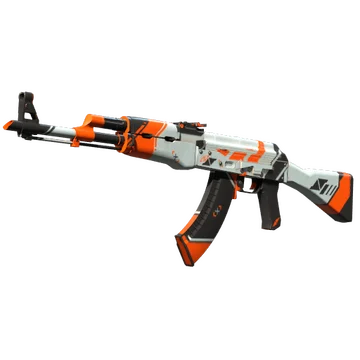
Another skin in the player's loadout is AK-47 | Asiimov. Unlike an aggressive Slaughter, this finish features a modern design and an orange, black, and white color scheme. Undoubtedly, it is one of the most recognizable designs in the CS community.
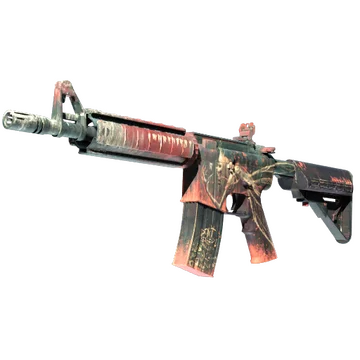
The last item in the player’s loadout is M4A4 | Tooth Fairy. In contrast to other skins, this item doesn’t feature a premium value. Still, it is known as one of the most popular and affordable designs that can offer a noticeable finish.
siuhy CS2 settings Stickers
siuhy is one of the professional players whose autograph stickers don’t feature a high value. For example, the most expensive one is siuhy (Gold) | Cologne 2026. This item commemorates Team Liquid’s participation at the Intel Extreme Masters Cologne Major 2026. In this tournament, siuhy and his teammates won only two matches against BIG and HEROIC. As a result, they finished 25th-27th. Currently, this sticker costs at least $4.72.
Another noticeable item is siuhy (Gold) | Budapest 2025. Its minimum price is only $2.66. This sticker commemorates Team Liquid’s participation at the StarLadder Budapest Major 2025. The team couldn’t deliver strong results, finishing in 15th-16th place.
The last sticker we want to mention is siuhy (Gold) | Rio 2022. Unlike the previous items, it commemorates the siuhy’s participation at the Intel Extreme Masters Rio Major 2022 as part of Team GamerLegion. The team finished 17th-19th, losing to Cloud9 in the Challengers Stage. Currently, this sticker costs at least $4.17.
siuhy BIO
siuhy BIO
Kamil “siuhy” Szkaradek began his professional career in 2017. In his first years, the player participated in various online C-tier tournaments. For example, he played together with Ajkensiju, Byniowa, FeelMystery, BUNNIES, Closed quali ink, Rhaeks, Sadboys2001, Drwal na ostro, TDS-esport, and other teams. In early 2020, siuhy joined Izako Boars. Together, they won at the Esport Tour Pro Autumn 2020, Polish Esport Cup Fall 2020: Season 1, and ESEA Season 36: Advanced Division - Europe.
During his career, siuhy was a part of several prominent teams. Some of them are MOUZ, GamerLegion and now Team Liquid. He played over 100 matches with MOUZ and MOUZ NXT. No less notable is siuhy’s time in GamerLegion, where he demonstrated his adaptability and ability to perform at a high level.
Also, siuhy has participated in various S-tier tournaments, It includes the Intel Extreme Masters Cologne Major 2026, the StarLadder Budapest Major 2025, the BLAST Bounty Fall 2025, and the Perfect World Shanghai Major 2024. The player currently has three MVP trophies. It includes ESL Pro League Season 18, ESL Pro League Season 19, and BetBoom Dacha Belgrade 2024.
