


shroud CS2 settings
Michael “shroud” Grzesiek (born June 2, 1994) is a retired Canadian professional Counter-Strike: Global Offensive player of Polish descent. The player is known for his highly skilled aim and exceptional game sense. He also has the nickname “King of Reddit” due to his streaming career and his sharing of highlights on the platform. He was also a part of Cloud9 from 2014 till 2017. During his career, the player won multiple tournaments like FACEIT League 2 2014 NA League, iBUYPOWER Cup, ESL Pro League Season 4 – Finals, and Americas Minor Championship – Kraków 2017. Overall, fans remember shroud for calm, collected decision-making in high-pressure 1vX clutch situations.
shroud CS2 settings Crosshair
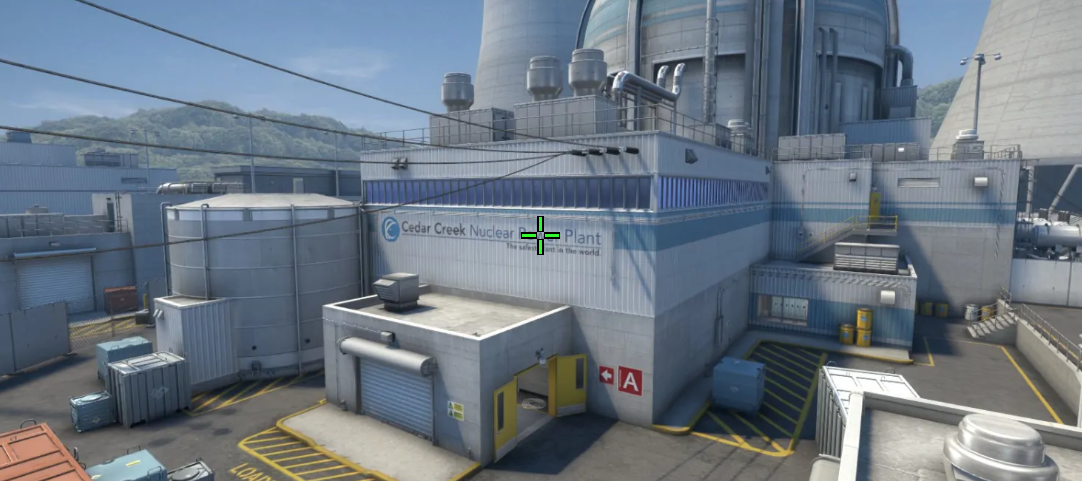
These settings provide a highly visible crosshair. It is designed for easy tracking. The core lies in the combination of Length (5) and Thickness (1.5). It creates longer, thicker bars than traditional micro-crosshairs. It also makes the player’s aim point impossible to lose during rapid flicks or chaotic utility use. Another crucial detail is a Gap (-2). It pulls these lines inward, leaving a small, well-defined window at the center for lining up headshots.
Also, shroud keeps Dot disabled. When combined with disabled Follow Recoil, it ensures that central pixels remain uncluttered and perfectly static while shooting or moving. To keep the crosshair highly visible against any background, the player sets its color to Green and its Alpha Value to 255. As a result, shroud can see it equally clear against dark corners and bright backgrounds.
CSGO-oWwnn-Keks9-w8fEW-LnBEY-pYOAK
shroud CS2 settings Mouse
shroud uses a medium-sensitivity configuration. His 1600 DPI, combined with a 0.6 sensitivity, results in 960 eDPI. By using a higher DPI, the player reduces sensor input latency and pixel skipping. At the same time, the 960 eDPI maintains a versatile speed. It is suitable for quick 180-degree turns and steady enough for precise headshot micro-adjustments. In the end, default Windows Sensitivity (6) ensures clean 1:1 mouse input.
shroud CS2 settings Viewmodel
These viewmodel settings feature a clean central screen space. shroud gets maximum visibility by setting FOV to 68 and Offset X to 2.5. This combination of settings moves the weapon model as far to the right edge of the screen as possible. Also, Offset Z (-1.5) shifts the rifle down toward the bottom frame. No less important is Offset Y (1), which pushes the weapon slightly forward. Additionally, shroud uses Presetpos 2, the wide-angle preset.
viewmodel_fov 68; viewmodel_offset_x 2.5; viewmodel_offset_y 1; viewmodel_offset_z -1.5; viewmodel_presetpos 2.
shroud CS2 settings Video settings
shroud prefers settings that give the player maximum visual accuracy, high quality, and a wide view on high-resolution displays. The player uses a 2560x1440 native resolution (16:9). It makes distant targets, the slightest details, and interface elements look especially clear compared to stretched, lower-quality resolutions. Also, shroud sets Boost Player Contrast enabled. It ensures that the player will see player models more clearly against bright or dark background textures.
For an overall better experience, shroud also sets high quality for various details, such as Global Shadow Quality, Shader Detail, and Model/Texture Detail, while setting Ambient Occlusion to Medium. It provides realistic lighting, detailed textures, and clear corner shadows without sacrificing target visibility. For a clean, highly detailed competitive look, he also chooses 4x MSAA. In the end, to prevent input delay, shroud disables V-Sync and G-Sync.
🚀 shroud CS2 settings Launch options
In the competitive scene, it is crucial to use every possible setting to keep your session running smoothly and avoid potential issues. That’s why many pro players use launch options. Some of these options could be especially helpful. For example, -freq 240 forces the game to use the exact refresh rate. It also prevents accidental capping at 60Hz or 144Hz.
-novid -high -tickrate 128 -freq 240
shroud CS2 settings Stickers
shroud is one of the players whose sticker autographs sit solidly between cheap and elite-value items. For example, the most expensive one is shroud (Gold) | Krakow 2017. Currently, its price starts from $296. This sticker commemorates shroud's participation (as part of Cloud9) in the PGL Major Kraków 2017.
Another worth mentioning sticker is shroud (Foil) | MLG Columbus 2016. Currently, it costs at least $139. Similar to the previous item, it commemorates the player's and his team's participation in the MLG Major Championship: Columbus 2016.
The last sticker we cannot ignore is shroud (Foil) | Cluj-Napoca 2015. Its price starts at $84.73, making it the cheapest sticker among the items mentioned. This sticker commemorates shroud's participation in the DreamHack Open Cluj-Napoca 2015.
shroud BIO
shroud BIO
Michael “shroud” Grzesiek is one of the most talented riflers in Counter-Strike history. Currently retired from the pro scene, he continues to stream his gameplay on social media platforms, sharing highlights from his sessions with over 11 million followers on Twitch and almost 7 million subscribers on YouTube.
shroud started his CS:GO career by participating in online and offline tournaments as part of different teams, including Slow Motion, Manajuma, and Mediocre Gamers. Soon, he joined Cloud9 in mid-2014. He led the team to victory at multiple tournaments. Among them are the FACEIT League 2 2014 NA League, iBUYPOWER Cup, ESL Pro League Season 4 - Finals, and Americas Minor Championship - Kraków 2017.
In 2017, shroud stepped down from the starting roster to move to full-time streaming for Cloud9. Still, in early 2018, Michael Grzesiek left the team and officially retired from professional CS:GO. Currently, the player continues to stream his gameplay, which includes CS and other titles.
