


KSCERATO CS2 Settings
Kaike “KSCERATO” Cerato (born September 12, 1999) is a Brazilian CS2 Rifler. He currently plays for FURIA. The player is considered one of the world’s best riflers and has ranked in the HLTV Top 20 five times from 2020 to 2025 (#18, #15, #9, #19, and #9). Kaike Cerato is a lurker, who takes care of flank routes and helps the team collect information on opponent positioning. He is known for clutch plays and staying calm under pressure and great crosshair placement.
KSCERATO CS2 Settings Crosshair
These settings create a thin, compact crosshair designed for maximum precision and uncluttered headshot framing. The core lies in the combination of Length (2), Thickness (0), and Gap (-3). It moves four bars tightly together. KSCERATO also prefers no Dot, keeping the Follow Recoil feature disabled. This lets the player stay focused on shooting without the moving bars.
Another detail is the crosshair color. KSCERATO uses Green, with RGB values of 0, 255, 170. It is paired with an Alpha Value of 255. As a consequence, the crosshair stands out against any background, including dark textures and map geometry. It could be a good option for players who want a small crosshair with thin lines that's still highly visible.
CSGO-CtPnQ-qFK4y-2pAEk-ZG9Z5-qhRqJ
KSCERATO CS2 Settings Mouse
KSCERATO uses a higher medium-sensitivity configuration. His 800 DPI, combined with a 1.45 sensitivity, results in 1160 eDPI. This sensitivity suits the aggressive style of the rifler, allowing the player to clear tight corners, check multiple angles quickly, and flick between targets. More importantly, KSCERATO doesn’t require wide arm movements. Another noticeable detail is a 4000Hz polling rate. It reduces reporting latency to less than 1ms. As a consequence, the player has extremely smooth tracking and instant cursor updates.
KSCERATO CS2 Settings Viewmodel
These viewmodel settings feature a standard setup for the pro scene. It is a popular option because of maximum visibility. This is possible because of FOV (68) and Offset X (2.5). These settings move the weapon model to the right edge of the screen. No less important is the combination of Offset Y (0) and Offset Z (-1.5). The first creates balanced rifle positioning, while the second shifts it down. Lastly, disabling Bob keeps the weapon still while the player moves.
viewmodel_fov 68; viewmodel_offset_x 2.5; viewmodel_offset_y 0; viewmodel_offset_z -1.5; viewmodel_presetpos 2.
KSCERATO CS2 Settings Video settings
KSCERATO prefers a 1280x960 stretched resolution with a 4:3 aspect ratio. It gives the player a slight advantage over native scaling mode. This is because the player models are slightly wider, making them easier to hit. This choice also reduces GPU load. The only disadvantage is that the player has a narrow field of view, which forces KSCERATO to move his arm more to make sure he’s not missing any angle.
Also, the pro sets Brightness to 97% and disables Boost Player Contrast. This keeps enemy outlines natural and helps the player avoid a slight frame drop. Another detail is the low quality of Shader, Model/Texture, and Particle details. It keeps the FPS as high as possible. Finally, KSCERATO chooses Anti-Aliasing as 8x MSAA and Texture Filtering Mode as Trilinear. The first smooths jagged pixel edges, while the second uses simple texture sampling to keep FPS high.
KSCERATO CS2 Settings Launch options
Launch options could be crucial for players who want to maximize system performance. Using these commands in Steam forces Windows to run the game in a specific way. For example, with -nojoy, you turn off controller support to free up memory. Still, adding each launch option requires learning what it does and which ones are truly useful.
-console -novid -tickrate 128 +clientport 27022 -d3d9ex -noaafonts -nojoy +mat_queue_mode 2 +cl_forcepreload 1
KSCERATO CS2 Settings Skins
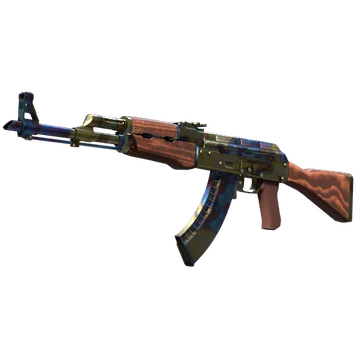
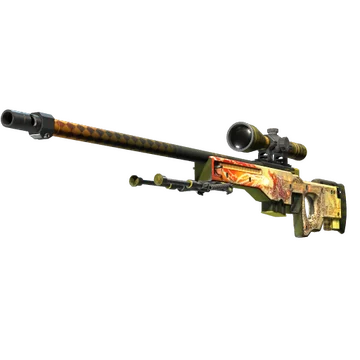
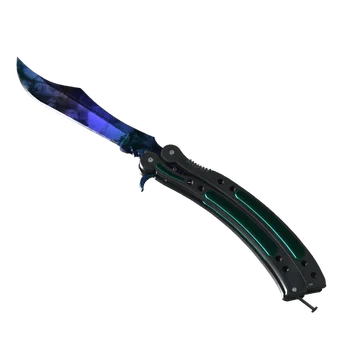
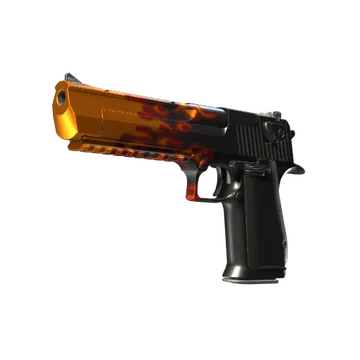
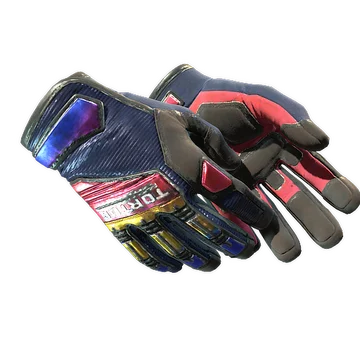
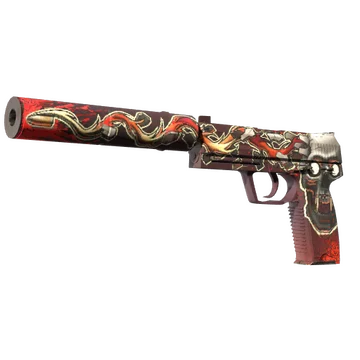
This loadout is divided into two main colors: red and blue. The most noticeable combination is the knife glove combo. It contains Butterfly Knife | Doppler Sapphire and Specialist Gloves | Fade. The knife is painted in a deep blue, while the gloves have a purple to red gradient with a deep blue base.
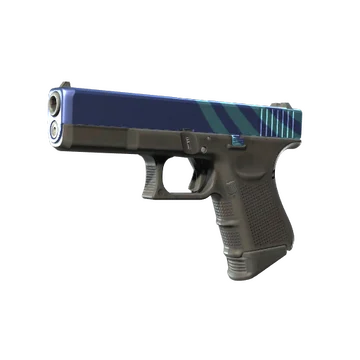
For the T side, KSCERATO chooses a clean blue metallic design of Glock-18 | High Beam. The player pairs it with the iconic AK-47 | Case Hardened, well-known for its blue-and-gold case-hardened finish and highly coveted Blue Gem patterns.
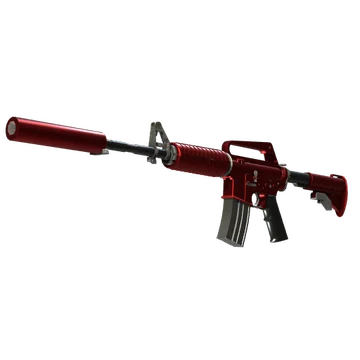
On the CT side, the player combines red and yellow colorways, adding the USP-S | Kill Confirmed, M4A1-S | Hot Rod, and AWP | Dragon Lore. The pistol features artwork of a skull and a bullet path. It adds more aggressiveness for the defending side. The M4 shares a clean, metallic red design that stands out in every match. Still, the gemstone here is the AWP, which is widely recognized as one of the most sought-after designs in CS. This skin from the Cobblestone Collection features a fire-breathing dragon painted in a Scandinavian-inspired style.
KSCERATO CS2 Settings Stickers
KSCERATO is among the pros whose autograph stickers offer a mid-budget price. For example, the most expensive among them is KSCERATO (Gold) | Katowice 2019. It currently costs at least $53.65. This sticker commemorates the player’s participation at the Intel Extreme Masters XIII - Katowice Major 2019 together with FURIA, finishing at 20th-22nd.
Another notable item is KSCERATO (Gold) | Shanghai 2024. It costs $17.16 and commemorates FURIA’s presence at the Perfect World Shanghai Major 2024, where the team ranked 9th-11th.
The last sticker is KSCERATO (Gold) | Cologne 2026. This item commemorates FURIA’s participation at the Intel Extreme Masters Cologne Major 2026. At this event, the team continuously defeated every opponent in Stage 3, the Quarterfinals, and the Semifinals. Still, Team Falcons stopped them in the Grand Final. This sticker currently costs $14.76.
KSCERATO BIO
KSCERATO BIO
Kaike “KSCERATO” Cerato began his career in 2015. Early on, he played for teams like Army5 Gaming, GATHERS eSports, and Dai Dai Gaming. In early 2018, KSCERATO joined FURIA. The player has played well since the beginning, helping the team to wins at events like Aorus League - Brazil: Finals - Season 1, ESL Brasil Premier League Season 5, ESEA Season 31: Global Challenge, ESL Pro League Season 12: North America, Intel Extreme Masters Chengdu 2025 and BLAST Rivals Fall 2025.
Being a massive football fan, KSCERATO frequently plays it with his FURIA teammates. It helps him clear his head and stay active. Still, Kaike Cerato's main passion is CS, where he spends most of his time studying grenade lineups and learning new tactics.
