


coldzera CS2 Settings
Marcelo “coldzera” David (born October 31, 1994) is a Brazilian CS2 Rifler. He is currently away from professional competition. The player is known as one of the best CS:GO players of all time. He is a two-time Major champion and was ranked #1 on HLTV’s Top 20 Players of the Year in 2016 and 2017. coldzera is known for his impressive game sense, clutch ability, disciplined positioning and map control of the main group.
coldzera CS2 Settings Crosshair
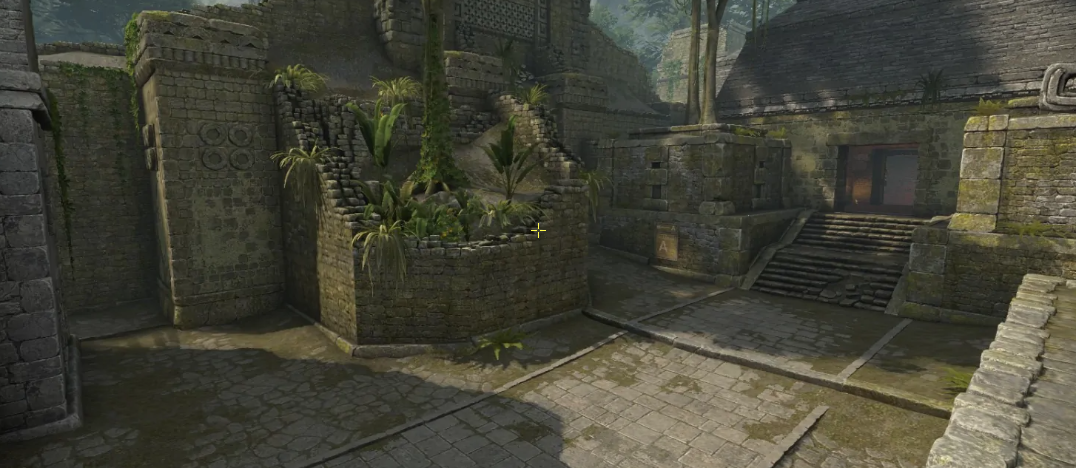
coldzera sets these settings to create a thin crosshair. The player chooses the Classic Static style. He also turns off the Dot and Follow Recoil features. It makes the crosshair perfectly still when moving and shooting, with a clear unobstructed center. The important detail is the combination of Length (2), Thickness (0), and Gap (-3). Because of this, the four thin lines pull together, creating a compact crosshair.
No less important is its color. While RGB is set to 0 values, coldzera chooses yellow. Also, an Alpha Value is 255. As a result, the static crosshair stays highly visible against both dark and bright maps like Train, Overpass, Anubis, and Mirage. This crosshair could be a good option for players who want a crosshair that doesn’t distract during the session, doesn’t cover the opponent's head, and stays noticeable so you won’t lose it during a tense fight.
CSGO-nO4ZF-nUuh7-TQE8J-OZ8kM-4JDhP
coldzera CS2 Settings Mouse
coldzera uses a medium sensitivity. His 800 DPI, combined with a 1.10 sensitivity, results in 880 eDPI. It is a comfortable setup that gives the player enough speed to clear close angles and make 180-degree turns with a wrist flick. At the same time, he has enough room for micro-adjustments to manage rifle spray control at medium-to-long ranges. In the end, the 2000Hz cuts input latency for smoother sensor reporting.
coldzera CS2 Settings Viewmodel
These viewmodel settings provide a compact weapon layout. coldzera uses a FOV of 60, which makes the weapon model look closer and larger. The player also uses Offset X (1). It pulls the rifle more toward the middle. At the same time, Offset Y (1) and Offset Z (-1) push it forward in depth and down. This clears the central crosshair area. Also, with Bob disabled, the weapon model stays still and doesn't distract coldzera during the game.
viewmodel_fov 60; viewmodel_offset_x 1; viewmodel_offset_y 1; viewmodel_offset_z -1; viewmodel_presetpos 1.
coldzera CS2 Settings Video settings
coldzera prefers to play with 4:3 stretched player models, maximum latency reduction, and high frame-rate stability. He sets a 1280x960 resolution and 4:3 aspect ratio. It gives him a slight advantage and also reduces GPU load. The Brightness (93%) creates a darker vision, while the enabled Boost Player Contrast ensures the opponent models pop out against the dark background and textures.
The player disables V-Sync and G-Sync. It allows him to eliminate artificial frame caps. coldzera also enables NVIDIA Reflex Low Latency. It reduces input lag and syncs the cpu and gpu. He also sets Ambient Occlusion to High value. It adds deep shading from the surrounding environment. It enhances the sense of depth. Still, it also adds a noticeable load on the graphics processor during rendering.
In the end, coldzera keeps Maximum FPS uncapped, allowing the GPU to generate the maximum possible frames. He sets Shader, Particle, and Model/Texture details to Low, while 4x MSAA smooths out pixelated edges.
coldzera CS2 Settings Launch options
Launch options are settings that help players run the game in a specific way. For example, some of them allow you to skip the intro video while launching CS:GO (-novid), while another forces Windows to give CS2 a higher CPU priority (-high). Launch options rely on the CPU and GPU.
-noforcemaccel -usenoforcedmparms -novid -w 1280 -h 1024 -refresh 240 -high
coldzera CS2 Settings Skins
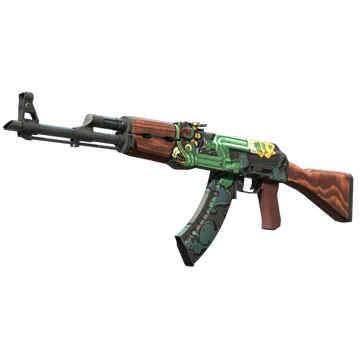
coldzera is among the players who don’t aim to build a massive inventory. His loadout is one of the most minimalist. At the same time, it’s no less eye-catching. For example, he plays with AK-47 | Fire Serpent. This skin has a long history in CS and was released in 2013. More importantly, it’s one of the most well-known finishes in the game due to its green Aztec fire serpent motif.
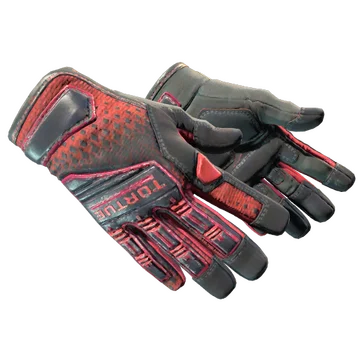
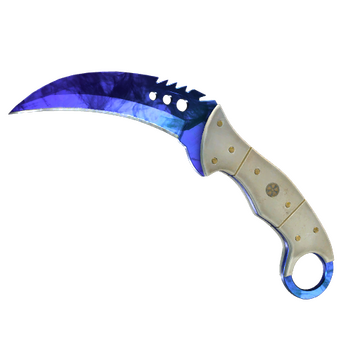
For the knife glove combo, coldzera chooses Talon Knife | Doppler Ruby and Specialist Gloves | Crimson Kimono. The knife features a deep crimson blade with an ivory handle. As a consequence, the inspect animation has a specific effect. The gloves emphasize this dynamic lighting with a red-and-black design and a diamond pattern.
coldzera CS2 Settings Stickers
coldzera is one of the pros whose stickers with his autograph can command a premium price. For example, the most valuable among them is coldzera (Gold) | Boston 2018. It currently costs at least $579. This item commemorates the player’s participation in the ELEAGUE Major Boston 2018. Alongside SK Gaming, the player posted strong results but lost in the Semifinals to Cloud9, finishing 3rd-4th.
No less notable is coldzera (Gold) | Krakow 2017, with a current minimum price of $296. This sticker commemorates the player’s participation in the PGL Major Kraków 2017. In this event, SK Gaming finished 5th-8th, losing to Astralis in the Quarterfinals.
Another important item is coldzera (Gold) | London 2018. Its current minimum value is $269. Unlike the previous stickers, this one commemorates the player’s participation at the FACEIT Major: London 2018 together with MIBR. While it was only the fifth event with the new team, coldzera led his teammates to the Semifinals, where they were stopped by Natus Vincere, finishing 3rd-4th.
coldzera BIO
coldzera BIO
Marcelo “coldzera” David began his professional career in 2013. In his early years, he played in various C-tier tournaments for teams like Mors, Afterall Gaming, SemXorah, and Dexterity Team. In 2015, coldzera joined Luminocity Gaming. He led his team to wins at the FACEIT League 2015 Stage 3 - North America, MAX5 Invitational, and, most importantly, MLG Major Championship: Columbus 2016. He was named Most Valuable Player for the tournament. Moreover, Marcelo David became the first Brazilian to win the award at a Major.
In 2016, coldzera joined SK Gaming, where he won his second major at ESL One: Cologne 2016. Together with the new team, the player participated in three more Majors, finishing 3rd-4th twice. In 2018, he joined MIBR. While the team won a few events, the overall results weren’t high. As a result, coldzera joined FaZe Clan the next year, where he won BLAST Pro Series: Copenhagen 2019 and Intel Extreme Masters XV - New York Online: Europe.
During the next few years, coldzera played for teams like Complexity Gaming, 00 Nation, Fake Natty, Legacy, RED Canids, and ODDIK. In late 2025, the player joined Fake do Biru, where he played until March 2026 in the B-tier tournaments. Currently, he is away from professional competition and not actively playing for any team.
