
How to Change Region on Steam?
 milica-dobrev
Moved to a new country and noticed your Steam store shows different prices or games? Or maybe you’re spending time abroad and certain titles just aren’t showing up. Steam connects your account to your current location, so updating your region helps everything match your actual location.
In this guide, you’ll learn how to change region on Steam, why it matters, what to expect after the change, and how to do it safely with no trouble. Keep reading and find out how to change region on Steam.

In article you will find:
How to Change Steam Region in 2025?
If you’re wondering how to change Steam region, the process isn’t as hard as it seems. Steam uses your payment method and IP address to determine your location. Here’s a simple guide:
- Open Steam and go to Settings > Account > Store & Purchase History.
- Click Update Store Country.
- Steam will automatically detect your current location based on your IP.
- Choose your new country, then make a purchase using a payment method from that country.
If you’re also looking to improve your profile visuals after updating your location, check out our guide on how to make animated Steam avatar and give your profile a fresh new look.
Why Do You Need to Change Steam Region?
You might need to change Steam region if you’ve moved to a different country or plan to stay there for a long time. Steam ties your store and pricing to your current location, so if you’re in a new location, your account should reflect that.
Some games also appear only in certain regions, so adjusting your location can help unlock access to titles you couldn’t see before. And while some users try to lower game prices by using another region, Steam watches this closely and applies strict rules. You should always keep your account details accurate to avoid problems.
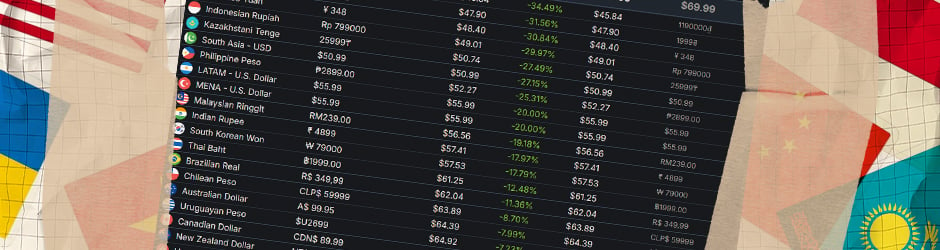
For example, below you can check the Assassin’s Creed Shadows prices across different regions to see how much they can vary.
And if you’re already updating things on your profile, it’s a good time to explore CS2 Console Commands. They let you customize your game and play exactly how you like.
What Happens if You Change Region on Steam?
When you decide to change Steam region, there are a few important things to be aware of. Your store prices will update to match the new country, and your current Steam Wallet balance won’t transfer. You’ll also need to use a payment method from that country to make any purchases.
Steam keeps track of changes through your IP address and payment history, so trying to switch locations just to access lower prices can lead to problems. You may lose access to the store, face restrictions on future region changes, or risk account suspension. Steam’s policies are strict for a reason, so it’s best to only go through this process if you’ve actually moved.
Will My Steam Games Still Work if I Move?
Yes, absolutely. Your Steam games will still work if you move or change your Steam region. When you acquire a game on Steam, you get a license to play that game, and this license is tied to your Steam account, not your geographical location. But there are a few things you need to consider:
- The price of new games may adjust to match the rates in your new region
- Your Steam store will show prices and promotions based on your updated country
- Certain games might be restricted or unavailable in the new region due to licensing or local laws
You might also be curious about managing other Steam features, like getting rid of those pesky trade holds. We have a helpful guide on how to remove Steam trade holds that you might find useful.
Things to Keep in Mind While Changing the Steam Region
If you’ve already decided to change your Steam region but still feel curious, there are several important things to think about before you move forward. These tips will help you learn how to change country in Steam smoothly and avoid any unexpected issues along the way.
First, Steam lets you update your store region and the currency you use only once every three months. This rule helps stop people from jumping between regions just to get better game prices, and it plays a big part in how to change Steam country the right way.
Second, for your Steam store region to change, you’ll need a billing address from that new region. So, if you don’t live there, you can ask friends in that country if they’re comfortable sharing their address and zip code for this purpose. Otherwise, you won’t be able to buy games from other countries, which directly affects how to change Steam store region.
Additionally, it’s very important to use a payment method that is linked to the same country as your new region. If you do not, Steam might suspend or even ban your account. Sometimes, a virtual card might be an option to consider.
Lastly, think about the VPN you use. Consider if it has servers in the countries you want to connect to, how fast and secure its connection methods are, and if there are any limits on the amount of data you can use.
To Sum Up
A region update on Steam makes sense when you move to a new country or stay there long-term. It helps your store match local prices and shows you the right game selection. Use a valid payment method from the new location to complete the process, and keep your account info accurate to avoid problems.
Want more helpful tips like this? Check out our blogs and see what else you can learn to improve your CS2 experience.
FAQ
Yes, you can change Steam region. The main way involves a purchase on the Steam Store with a payment method directly linked to the address in your new country.
You change your Steam region by add an item to your cart. Then, during the checkout process, pick your new country from the list. You will then need to finish the purchase with a payment method registered to an address within that new region.
There are many benefits, like access to region-specific game prices, finding lower prices, and access to games that are region-locked where you currently are. It also lets you use local payment methods if you have physically moved.
Yes, your Steam games will still function properly if you relocate or change your Steam region. Game licenses connect to your Steam account, not your location. Your existing library will stay fully ready to play.
When you change your Steam region, remember you will need a legitimate payment method from the new region. There is usually a three-month wait before you can change again, and your Steam Wallet funds will switch to the new currency.

Milica Dobrev is a writer/editor at Hellcase. Her favorite computer games are CS2 and Rust. She likes to share her experience and knowledge with CS2, Rust and Hellcase lovers.