
CS2 Trust Factor: How to Check Trust Factor in CS2
 riley-st-john
In CS2 (CS:GO), Trust Factor is a hidden score that influences matchmaking by pairing players with similar behavioral patterns together. However, as this score is undisclosed, many players are often left wondering how to enhance their CS2 Trust Factor.
This article aims to demystify the process, offering a series of effective strategies that can help players improve their CS2 Trust Factor, enjoy higher-quality matchmaking, and contribute to a more positive CS2 community. Here, you will find out what Trust Factor is, how to check Trust Factor in CS2 (CS:GO), and tips that will help you enhance your score.

In article you will find:
What is CS2 Trust Factor?
The CS2 Trust Factor is a feature of Valve’s matchmaking system for the game Counter-Strike: Global Offensive, introduced in 2017. This AI-based algorithm aims to improve the quality of player matchmaking by analyzing behavioral patterns of CS2 players and predicting player compatibility.
The CS2 Trust Factor isn’t a visible score or number. Still, it is calculated through a combination of factors both in and outside of CS2, such as the user’s behavior in other Steam games, the frequency of reports from other players, time spent playing CS2 and other Steam games, and more.
Players with similar levels of Trust Factor in CS2 (CS:GO) are matched together. Ideally, this leads to more enjoyable matches, as players with good conduct are paired together, and those who have been reported for abusive behavior or cheating are also grouped together. However, Valve does not publicly disclose the exact algorithm used to check the trust factor in CS2 to avoid manipulation.
How Does Trust Factor Form In CS2?
Valve officials never disclosed the full list of specific factors incorporated into the CS2 (CS:GO) Trust Factor system. They want players to enjoy their gaming experience on CS2 and other Steam games without fretting about the possibility of their particular individual actions impacting their Trust Factor.
Apart from that, as the CS2 Trust Factor system is being consistently updated, any disclosed list of factors that impact it would quickly become obsolete and lead to the community getting confused with inconsistencies in outdated guides.
As it is stated in Steam Support, Trust Factor is established by examining a user’s past activity both in CS2 (CS:GO) and on Steam, striving for the utmost accuracy in the system. Members of the CS2 community believe that other factors impacting your Trust Factors are in-game behavior, integrity, report rate, and communication quality.
How to Get Green CS2 Trust Factor
“The only way to improve your Trust Factor is to be a positive member of the CS2 (CS:GO) and Steam community.” – Steam Support.
However, we are here to help you improve your CS2 (CS:GO) Trust Factor, and we have gathered a list of tips that are believed to have helped other players in the past. Here are all the secrets on how to check the trust factor CS2 and how to increase it.
- Respect the Community Guidelines while playing the game.
Follow all the rules and guidelines set by Valve while playing CS2 (CS:GO) to ensure a fair and respectful gaming environment for all players. This involves not just avoiding behaviors that are expressly prohibited but also refraining from using third-party software and exploiting any mechanics in a way that undermines the competitive spirit of the game.
- Avoid using abusive actions, language, or comments in the in-game chat or forum discussions.
Ensure your interactions, both verbally and textually, are polite and respectful, keeping toxic behavior or comments away from the game and discussions. Maintain a positive demeanor in all interactions, offering constructive criticism where necessary and respecting differing perspectives.
- Engage positively with other players during gameplay.
Encourage a supportive gaming experience by communicating positively, assisting team members, and promoting a positive attitude during the match. Positive engagement involves not just treating your team with respect but also the opposing team. Sportsmanlike conduct, even in a competitive environment, goes a long way toward creating a friendly and enjoyable atmosphere.
- Establish a positive reputation within the Steam and CS2 community by contributing constructively.
Engage in meaningful discussions about gameplay strategy, updates, or community news, providing insightful contributions that enhance the knowledge and understanding of others. This can also involve creating or sharing high-quality user-generated content, such as game guides or playthroughs.
- Avoid damaging and killing your teammates.
On purpose, at least. Be careful to ensure you don’t inflict damage on your own teammates, as accidental or intentional team damage and team killing can disrupt the game, frustrate your teammates, and result in penalties or even game bans. It’s crucial to maintain situational awareness, particularly when using utilities that cause area damage.
- Participate in CS2 Overwatch.
Your involvement in this community moderation system helps to uphold the integrity of the game by identifying and removing players who cheat or otherwise violate the community guidelines. Your consistent and accurate judgments in Overwatch cases can greatly contribute to a better, fairer gaming environment.
- Use Steam Guard.
Not only does this provide an additional security layer to your account, but it also sends a strong message about the value you place on responsible gaming. Maintaining a secure account helps prevent situations that could negatively impact others, so find out how to set up Steam Guard in our article if you have not already.
- Do not engage in any kind of fraud.
Avoid any actions that could be considered deceitful or dishonest, such as scamming other players, as being truthful and transparent in your transactions, trades or any other interactions within the Steam and CS2 community is crucial.
- Do not join suspicious Steam Groups.
Be aware of the Steam groups you join. Some groups may engage in dubious activities that could negatively impact your Trust Factor. Associating with such groups might be interpreted as endorsing or participating in their activities, which could negatively affect your score.
The CS2 (CS:GO) Trust Factor matchmaking system will keep evolving, but players can enhance their matchmaking experience simply by playing CS2 (CS:GO) and other Steam games honestly and consistently.
The more a user plays, the more data the system gathers, thus facilitating more accurate player matching. Essentially, the system improves at determining appropriate matches as you engage more with the game and the platform.
Does Having Prime Status Improve Your Trust Factor in CS2?
Although Valve has not publicly shared the exhaustive list of specific elements that are considered when calculating the CS2 Trust Factor to maintain the integrity and effectiveness of the system, they did declare that activating the Prime Status indeed increases your Trust Factor.
CS2 players who own the Prime Status and have a mobile phone associated with their Steam accounts benefit from it by enjoying an improved matchmaking experience compared to those players who decided not to provide verification information. Now, let’s see how to check Trust Factor in CS2 (CS:GO).
How To Check Your Trust Factor?
If you wonder how to check your Trust Factor in CS2 (CS:GO), you are in no luck. As it stands now, there’s no mechanism available for you to directly check your Trust Factor score. The primary objective of the system is to provide a better matchmaking experience, relieving players from the stress of managing or optimizing specific elements.
While the CS2 (CS:GO) Trust Factor matchmaking strives to pair together players of similar scores, it’s worth noting that, similar to skill groups, the diversity of players in a server could fluctuate based on various factors. These factors may include the time of day, the geographical location of the player, and the specific maps that they’ve queued for.
However, if you suspect that the quality of your matchmaking experience in Counter-Strike: Global Offensive got worse over time due to your Trust Factor being poor, you can contact Steam Support by sending an e-mail with the “Trust Factor Feedback” to this address: CSGOTeamFeedback@valvesoftware.com.
Provide a detailed description of your gaming experience as well as your Steam ID, and your case will be investigated. For more information, visit the official Steam Support F.A.Q. page that covers everything you need to know about CS2 (CS:GO) Trust Factor.
CS2 Trust Factor In-Game Warnings
The vast majority of CS2 (CS:GO) players might have at least once encountered an in-game warning about a low Trust Factor of their lobby member.
Before starting a Competitive match, all Prime-status players are notified if another member of their lobby, who is also using Prime, might impact the quality of their matchmaking experience due to their lower Trust Factor. This notification is exclusively displayed to players who hold Prime status. There are two types of warning messages you may receive:
- Your matchmaking experience may be slightly impacted because the Trust Factor of *the player* is lower than yours.
- Your matchmaking experience will be significantly affected because the Trust Factor of *the player* is substantially lower than yours.
Both of these messages suggest that a player in your lobby has a lower trust score than you, which could potentially detract from the quality of your match. As this player enhances their Trust Factor, fewer users will receive this message.
When players form an in-game party, the matchmaking system uses the Trust Factor of the player with the lowest score within the group for matchmaking purposes. This ensures a balanced gameplay experience by taking into account the potential impact of the player with the lowest Trust Factor on the overall game environment.
While it is not confirmed, a part of the community believes that proceeding with playing together with users who have a low Trust Factor might affect yours negatively. So, if you fear this can impact your further gaming experience, too, try avoiding engaging with these players.
Do New Players Have a Low Trust Factor?
CS2 (CS:GO) newcomers do not necessarily get a low Trust Factor assigned. The Trust Factor within the game is influenced by a player’s historical interactions and behavior, not just in CS2 (CS:GO), but across the broader Steam platform as well.
If you’ve exhibited positive and constructive behavior within the Steam Community previously, it’s probable that you’ll commence your CS2 (CS:GO) journey with a favorable Trust Factor. Essentially, your past good conduct and positive contributions can provide a significant initial boost to your Trust Factor in the game, underlining the value of maintaining consistent, positive interactions across all Steam services.
To Wrap Up!
As in any other online competitive game, trust in CS2 (CS:GO) plays a crucial role in shaping the quality of the player experience. The key to improving your Trust Factor in CS2 (CS:GO) is understanding what the system values: a positive, fair, and engaged gaming experience. From respecting community guidelines to avoiding team damage, the tips we shared here will help you enhance your Trust Factor.
Make CS2 (CS:GO) a better place and explore Hellcase Blog for more valuable content about CS2 (CS:GO) skins and other cosmetic items, essential in-game guides, and the freshest esports news. Stay tuned!
FAQ
In CS2, Trust Factor is a hidden score that influences matchmaking by pairing players with similar behavioral patterns together. It is calculated by an AI-based algorithm that considers factors such as the user’s behavior in CS2 and other Steam games, the frequency of reports from other players, competitive integrity, and more.
Yes, Trust Factor exists in CS2. It works like in CS:GO, matching you with players of similar behavior based on factors like reports, VAC bans, and Steam account activity.
Be a positive member of the CS2 and Steam Community, engage positively with other players during gameplay, and play fair. For more tips, check out the full version of our article.
Yes, it is officially confirmed by Valve that obtaining Prime Status and associating a mobile number with your Steam account directly impacts your Trust Factor positively in CS2.
To improve your CS2 Trust Factor, refrain from using any malicious software and avoid using abusive actions, language, or comments in the in-game chat or forum discussions. Also, acquire a Prime Status and add a mobile phone to your Steam account.
The CS2 Trust Factor isn’t a visible score or number, and as it stands now, there’s no mechanism available for you to directly check your Trust Factor score. Play fair and be a positive member of the community to maintain a high Trust Factor and keep your gaming experience enjoyable.
Players with similar Trust Factors are matched together. Ideally, this leads to more enjoyable matches, as players with good conduct are paired together, and those who have been reported for abusive behavior or cheating are also grouped together. However, the exact algorithm used to calculate the Trust Factor is not publicly disclosed by Valve to avoid manipulation.
There is no answer to how much time is needed to increase the CS2 Trust Factor. Keep playing fair, spread a positive attitude within your matches, and be an active participant of the CS2 community on Steam to get a green trust score.
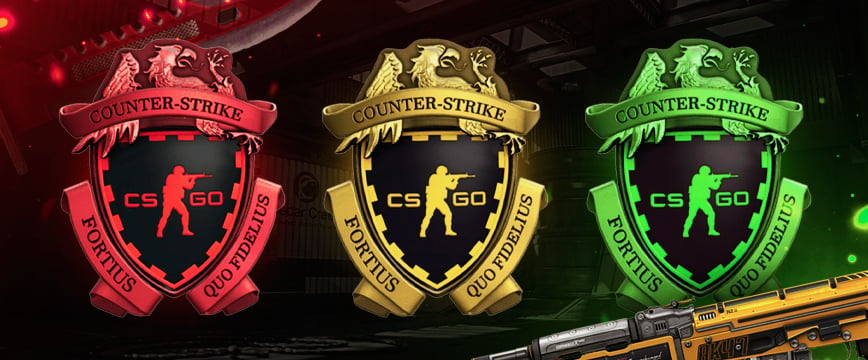
You can check your CS2 Trust Factor by playing with friends and having them see your status in the lobby. It shows as green, yellow, or red next to your name. Alternatively, play matchmaking regularly; good behavior improves it, and toxic actions lower it.
Trust Factor in CS2 works by analyzing your Steam account history, game behavior, and reports. Positive actions like fair play and no reports increase your Trust Factor. Negative actions like cheating, griefing, or frequent reports lower it. It affects matchmaking, pairing you with players who have similar trust levels: green, yellow, or red.
You can boost your Trust Factor in CS2 by playing fair, avoiding cheats, finishing matches without leaving, and staying positive to prevent reports. Enable Steam Guard and 2FA for extra security, and stay active on Steam by playing regularly and interacting positively with the community.

Average CS enjoyer. Knows everything about CS skins, including which ones will suit your weapons best.